
In this chapter we will learn about how to optimize Drupal to improve
its performance and speed. There are few steps through which we can
improve the performance of the website.
Following are the steps that would help one optimize the website.
Following are the steps that would help one optimize the website.
- Enable Page Caching
Enable Cache blocks and Cache pages for Anonymous Users. Page caching lets your contents store in different database cache tables.Page cache is stored in the HTML content. It optimizes the page load time for anonymous users.
Step (1):Click on Configuration from the menu bar.
 Step (2):In Development section click on Performance.
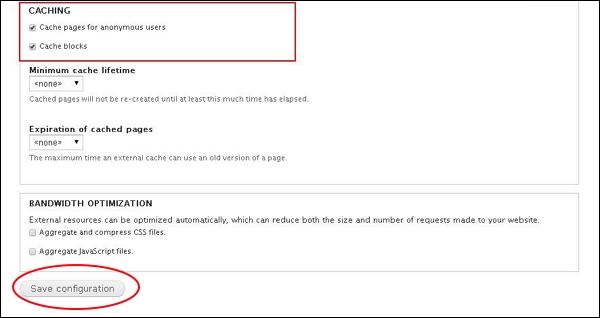
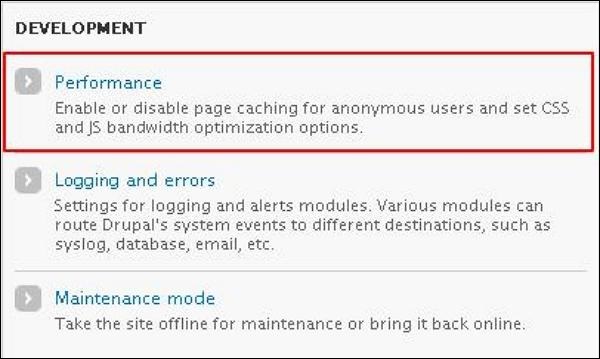 Step (3): Next,enable Cache blocks and Cache pages for Anonymous Users by checking both the boxes. Then, click on Save Configuration.
- Compress CSS files
If you have many CSS files, it can lower your websites speed. Compress them by enabling Aggregate and Compress CSS files.
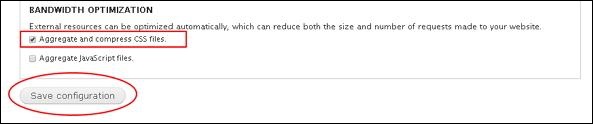 Enable this setting from Administration->Configuration->Development->Performance section.Drupal decreases the number and size of your CSS files.
- Js Aggregation
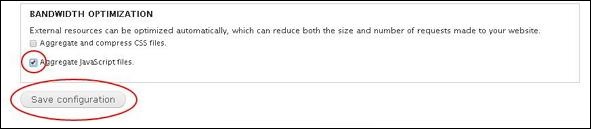
Java files can also affect the performance and speed of your website. To compress this enable the Aggregate JavaScript files from the Administration->Configuration->Development->Performance in the bandwidth optimization section.
- Moving Media Files and Static files to a CDN
This decreases the number of requests that a shared hosting handles. Use CDN (Content Delivery Network) that hosts your media files and static files. CDN acts as an external cache for your files and will store them in high performance servers so that it is optimized.
- Optimize Images Size and Their Number
Do not have many images which consume more space as this leads to slow website. Always resize your images and have few that are related to your website.
- Theme Optimization
Optimizing themes is a very important aspect. Media files like high quality images, videos, audios and flash can affect your website and slow down the speed resulting in low performance. Try reducing the size and number of media files or maybe you can avoid using flash.


No comments:
Post a Comment