
Firebase offers several ways of filtering data.
limitToLast method returns specified number of items beginning from the last one.
Our example is showing how this works. Since we only have two players in database, we will limit queries to one player.
The second query will log "Amanda" since we are ending query with this name.
Third one will log "John" since we are searching for player with that name.
The fourth example is showing how we can combine filters with "age" value. Instead of string we are passing number inside startAt() method since age is represented by a number value.

Limit to First and Last
limitToFirst method returns specified number of items beginning from the first one.limitToLast method returns specified number of items beginning from the last one.
Our example is showing how this works. Since we only have two players in database, we will limit queries to one player.
Example
var firstPlayerRef = firebase.database().ref("players/").limitToFirst(1);

var lastPlayerRef = firebase.database().ref('players/').limitToLast(1);

firstPlayerRef.on("value", function(data) {
   console.log(data.val());
}, function (error) {
   console.log("Error: " + error.code);
});

lastPlayerRef.on("value", function(data) {
   console.log(data.val());
}, function (error) {
   console.log("Error: " + error.code);
});
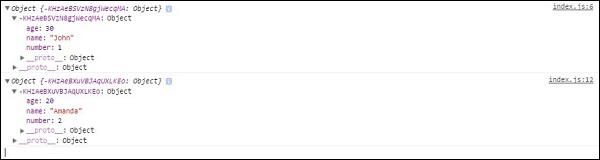
Our console will log first player from the first query, and the last player from the second query.
Other Filters
We can also use other Firebase filtering methods. startAt(), endAt() and equalTo() can be combined with ordering methods. In our example, we will combine it with orderByChild() method.Example
var playersRef = firebase.database().ref("players/");

playersRef.orderByChild("name").startAt("Amanda").on("child_added", function(data) {
   console.log("Start at filter: " + data.val().name);
});

playersRef.orderByChild("name").endAt("Amanda").on("child_added", function(data) {
   console.log("End at filter: " + data.val().name);
});

playersRef.orderByChild("name").equalTo("John").on("child_added", function(data) {
   console.log("Equal to filter: " + data.val().name);
});

playersRef.orderByChild("age").startAt(20).on("child_added", function(data) {
   console.log("Age filter: " + data.val().name);
});
First query will order elements by name and filter from the player with the name Amanda. The console will log both players.
The second query will log "Amanda" since we are ending query with this name.
Third one will log "John" since we are searching for player with that name.
The fourth example is showing how we can combine filters with "age" value. Instead of string we are passing number inside startAt() method since age is represented by a number value.


No comments:
Post a Comment