
Unlike a Cookie, Session data is stored on server. Session is
the time interval when a client logs into a server and logs out of it.
The data, which is needed to be held across this session, is stored in a
temporary directory on the server.
A session with each client is assigned a Session ID. The Session data is stored on top of cookies and the server signs them cryptographically. For this encryption, a Flask application needs a defined SECRET_KEY.
Session object is also a dictionary object containing key-value pairs of session variables and associated values.
For example, to set a ‘username’ session variable use the statement −
A Form is posted back to ‘/login’ and now session variable is set. Application is redirected to ‘/’. This time session variable ‘username’ is found.
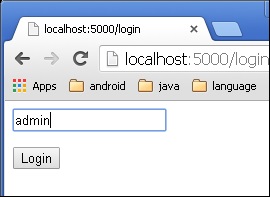
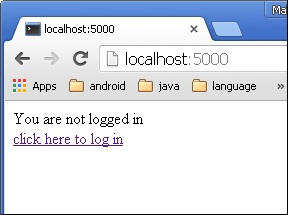 The link will be directed to another screen. Type ‘admin’.
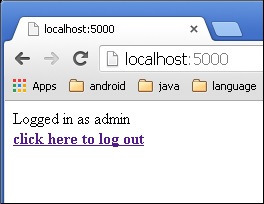
 The screen will show you the message, ‘Logged in as admin’.
A session with each client is assigned a Session ID. The Session data is stored on top of cookies and the server signs them cryptographically. For this encryption, a Flask application needs a defined SECRET_KEY.
Session object is also a dictionary object containing key-value pairs of session variables and associated values.
For example, to set a ‘username’ session variable use the statement −
Session[‘username’] = ’admin’To release a session variable use pop() method.
session.pop('username', None)
The following code is a simple demonstration of session works in Flask. URL ‘/’ simply prompts user to log in, as session variable ‘username’ is not set.@app.route('/') def index(): if 'username' in session: username = session['username'] return 'Logged in as ' + username + '<br>' + \ "<b><a href = '/logout'>click here to log out</a></b>" return "You are not logged in <br><a href = '/login'></b>" + \ "click here to log in</b></a>"As user browses to ‘/login’ the login() view function, because it is called through GET method, opens up a login form.
A Form is posted back to ‘/login’ and now session variable is set. Application is redirected to ‘/’. This time session variable ‘username’ is found.
@app.route('/login', methods = ['GET', 'POST'])
def login():
   if request.method == 'POST':
      session['username'] = request.form['username']
      return redirect(url_for('index'))
   return '''

   <form action = "" method = "post">
      <p><input type = text name = username/></p>
      <p<<input type = submit value = Login/></p>
   </form>

   '''
The application also contains a logout() view function, which pops out ‘username’ session variable. Hence, ‘/’ URL again shows the opening page.
@app.route('/logout')
def logout():
   # remove the username from the session if it is there
   session.pop('username', None)
   return redirect(url_for('index'))
Run the application and visit the homepage. (Ensure to set secret_key of the application)
from flask import Flask, session, redirect, url_for, escape, request
app = Flask(__name__)
app.secret_key = 'any random string’
The output will be displayed as shown below. Click the link “click here to log in”.
The link will be directed to another screen. Type ‘admin’.
The screen will show you the message, ‘Logged in as admin’.

No comments:
Post a Comment