
Http protocol is the foundation of data communication in world wide
web. Different methods of data retrieval from specified URL are defined
in this protocol.
The following table summarizes different http methods −
By default, the Flask route responds to the GET requests. However, this preference can be altered by providing methods argument to route() decorator.
In order to demonstrate the use of POST method in URL routing, first let us create an HTML form and use the POST method to send form data to a URL.
Save the following script as login.html
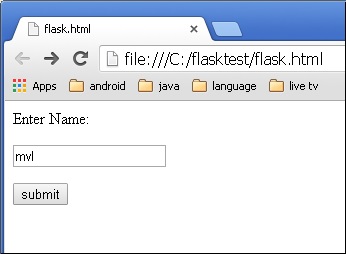 Form data is POSTed to the URL in action clause of form tag.
http://localhost/login is mapped to the login() function. Since the server has received data by POST method, value of ‘nm’ parameter obtained from the form data is obtained by −
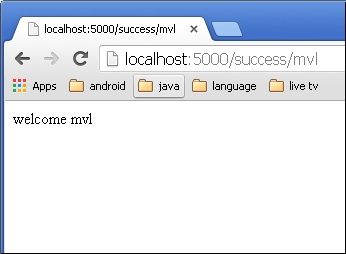 Change the method parameter to ‘GET’ in login.html and open it again in the browser. The data received on server is by the GET method. The value of ‘nm’ parameter is now obtained by −
The following table summarizes different http methods −
| Sr.No | Methods & Description |
|---|---|
| 1 |
GET Sends data in unencrypted form to the server. Most common method. |
| 2 |
HEAD Same as GET, but without response body |
| 3 |
POST Used to send HTML form data to server. Data received by POST method is not cached by server. |
| 4 |
PUT Replaces all current representations of the target resource with the uploaded content. |
| 5 |
DELETE Removes all current representations of the target resource given by a URL |
In order to demonstrate the use of POST method in URL routing, first let us create an HTML form and use the POST method to send form data to a URL.
Save the following script as login.html
<html>
   <body>

      <form action = "http://localhost:5000/login" method = "post">
         <p>Enter Name:</p>
         <p><input type = "text" name = "nm" /></p>
         <p><input type = "submit" value = "submit" /></p>
      </form>

   </body>
</html>
Now enter the following script in Python shell.
from flask import Flask, redirect, url_for, request
app = Flask(__name__)

@app.route('/success/<name>')
def success(name):
   return 'welcome %s' % name

@app.route('/login',methods = ['POST', 'GET'])
def login():
   if request.method == 'POST':
      user = request.form['nm']
      return redirect(url_for('success',name = user))
   else:
      user = request.args.get('nm')
      return redirect(url_for('success',name = user))

if __name__ == '__main__':
   app.run(debug = True)
After the development server starts running, open login.html in the browser, enter name in the text field and click Submit.
Form data is POSTed to the URL in action clause of form tag.http://localhost/login is mapped to the login() function. Since the server has received data by POST method, value of ‘nm’ parameter obtained from the form data is obtained by −
user = request.form['nm']It is passed to ‘/success’ URL as variable part. The browser displays a welcome message in the window.
Change the method parameter to ‘GET’ in login.html and open it again in the browser. The data received on server is by the GET method. The value of ‘nm’ parameter is now obtained by −User = request.args.get(‘nm’)Here, args is dictionary object containing a list of pairs of form parameter and its corresponding value. The value corresponding to ‘nm’ parameter is passed on to ‘/success’ URL as before.


No comments:
Post a Comment