
You can change cPanel’s look and feel using this interface. cPanel
has two major interface styles in which you can manage your web hosting.
Although these interface is very standard, but these can be modified by
your server administrator or reseller account admin to change its logo
and icons etc.
To modify your cPanel Style follow these steps −
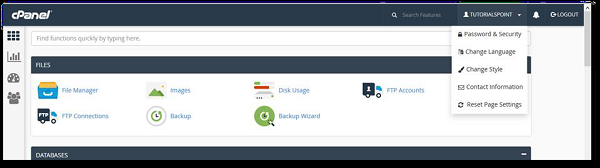
Step 1 − In cPanel Home click username written over the right corner of your dashboard.
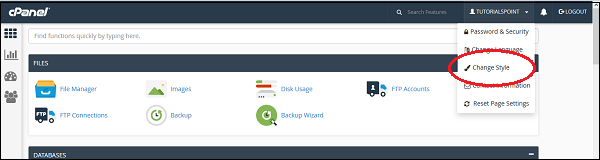
 Step 2 − Click Change Style option. You will find Change Style Interface.
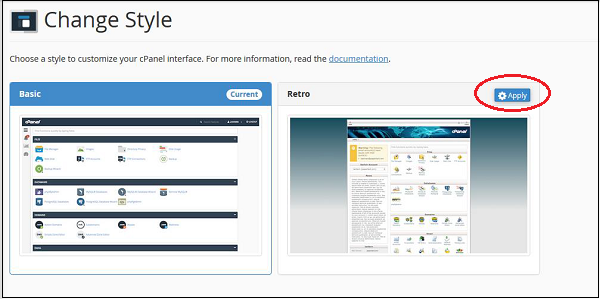 Step 3 − Choose any style option from the available styles,
click Apply button which can be found over the top of the style to load
the new style.
Step 3 − Choose any style option from the available styles,
click Apply button which can be found over the top of the style to load
the new style.
 Step 4 − cPanel will automatically reload to apply the new
setting and you will find a new interface according to the one you
selected.
Step 4 − cPanel will automatically reload to apply the new
setting and you will find a new interface according to the one you
selected.
To modify your cPanel Style follow these steps −
Step 1 − In cPanel Home click username written over the right corner of your dashboard.
Step 2 − Click Change Style option. You will find Change Style Interface.
Step 3 − Choose any style option from the available styles,
click Apply button which can be found over the top of the style to load
the new style.
Step 4 − cPanel will automatically reload to apply the new
setting and you will find a new interface according to the one you
selected.

No comments:
Post a Comment