
When you are successfully logged into a cPanel Dashboard, first and
foremost, change the password of your cPanel account. This is very
important, so that the security of cPanel remains intact. Nobody would
want their website to be hacked.
To change your cPanel Password, follow these steps −
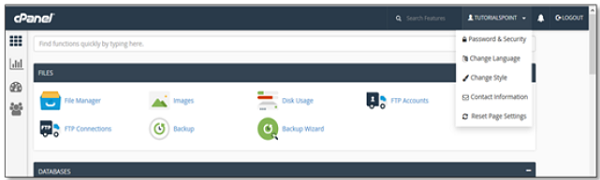
Step 1 − In cPanel Home, click username written over the right corner of the dashboard.
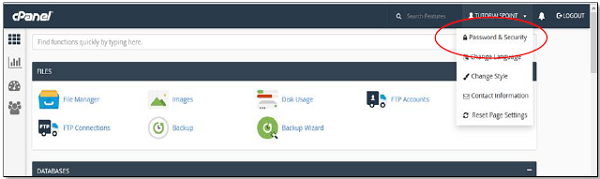
 Step 2 − Click Password & Security option. You will find Change Password Interface.
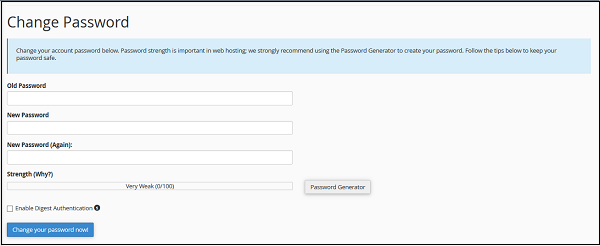
 Step 3 − Write your old password and in the following fields, write your new password twice.
 Step 4 − Enable digest authentication option if you
need to access your webdisk via an unencrypted connection in windows
machine. This type of connection is unsecured and not recommended.
Step 4 − Enable digest authentication option if you
need to access your webdisk via an unencrypted connection in windows
machine. This type of connection is unsecured and not recommended.
Step 5 − Click Change your password now! Button to change your current password. If successful, then cPanel will automatically log you out and you will have to login again with your new password.
To change your cPanel Password, follow these steps −
Step 1 − In cPanel Home, click username written over the right corner of the dashboard.
Step 2 − Click Password & Security option. You will find Change Password Interface.
Step 3 − Write your old password and in the following fields, write your new password twice.
Step 4 − Enable digest authentication option if you
need to access your webdisk via an unencrypted connection in windows
machine. This type of connection is unsecured and not recommended.Step 5 − Click Change your password now! Button to change your current password. If successful, then cPanel will automatically log you out and you will have to login again with your new password.


No comments:
Post a Comment