
In this chapter we will study about Comments in Drupal. You
can enable or disable the comments on your website. You can control, who
can comment on your website's content and can manage those comments.
Following are the simple steps to configure comments in Drupal.
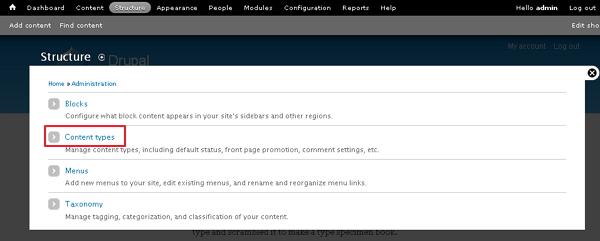
Step (1): Go to Structure and click on Content types as shown below.
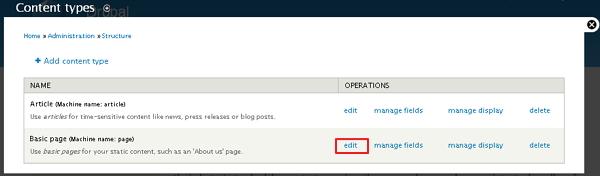
 Step (2): Next, click on Edit link that you would like to change the comment setting.
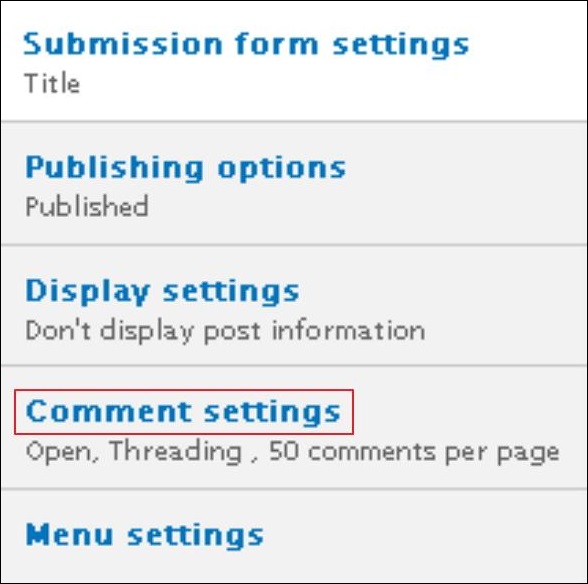
 Step (3): Click on Comment settings category as shown below.
 Step (4): Select open from the drop down menu under Default comment setting for new content. This will allow commenting on your website.
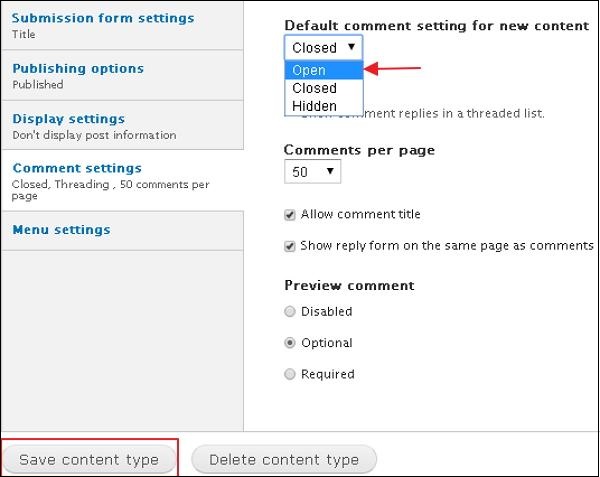 Click on Save Content type button to save your configuration settings.
Following are the simple steps to configure comments in Drupal.
Step (1): Go to Structure and click on Content types as shown below.
Step (2): Next, click on Edit link that you would like to change the comment setting.
Step (3): Click on Comment settings category as shown below.
Step (4): Select open from the drop down menu under Default comment setting for new content. This will allow commenting on your website.
Click on Save Content type button to save your configuration settings.

No comments:
Post a Comment