
Image converter can be used for converting image format of any image.
It can convert from one supported type to any other supported type. To
use Image converter, open the interface by clicking Converter link from Images section.
Step 1 − Navigate to the directories by clicking on folder icon on the left hand side, as we did above.
Step 2 − Select the File or Folder which you want to resize by clicking on the Name of File or Folder.
Note − Image Converter can be used with a single file or folder.
Step 3 − Select new file type from the prompt as shown below, which can be −
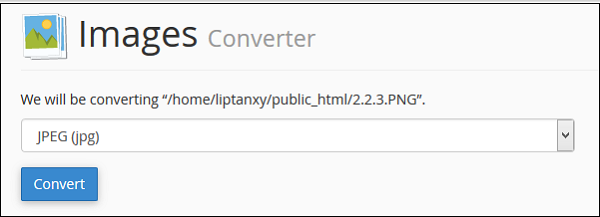 Step 4 − Finally Click on Convert to convert the file type.
Step 1 − Navigate to the directories by clicking on folder icon on the left hand side, as we did above.
Step 2 − Select the File or Folder which you want to resize by clicking on the Name of File or Folder.
Note − Image Converter can be used with a single file or folder.
Step 3 − Select new file type from the prompt as shown below, which can be −
- Portable Network Graphics (.PNG)
- JPEG (.JPG)
- GIF (.GIF)
- Bitmap (.BMP)
Step 4 − Finally Click on Convert to convert the file type.

Many instances many of the pictures and photos that we downloaded from web are of PSD format. However in case you want actually helpful picture supplies, solely PSD format information are in a position to meet the wants. If you want to learn more about this topic please visit more
ReplyDelete