
In this chapter you will learn how to create a Paragraph and how to add it to a document using Java. Paragraph is a part of a page in a Word file.
After completing this chapter, you will be able to create a Paragraph and perform read operations on it.
The following code snippet is used to create a spreadsheet:
The following code snippet is used to create a Run.
After completing this chapter, you will be able to create a Paragraph and perform read operations on it.
Create a Paragraph
First of all, let us create a Paragraph using the referenced classes discussed in the earlier chapters. By following the previous chapter, create a Document first, and then we can create a Paragraph.The following code snippet is used to create a spreadsheet:
//Create Blank document
   XWPFDocument document= new XWPFDocument();
//Create a blank spreadsheet
   XWPFParagraph paragraph = document.createParagraph();
Run on Paragraph
You can enter the text or any object element, using Run. Using Paragraph instance you can create run.The following code snippet is used to create a Run.
XWPFRun run=paragraph.createRun();
Write into a Paragraph
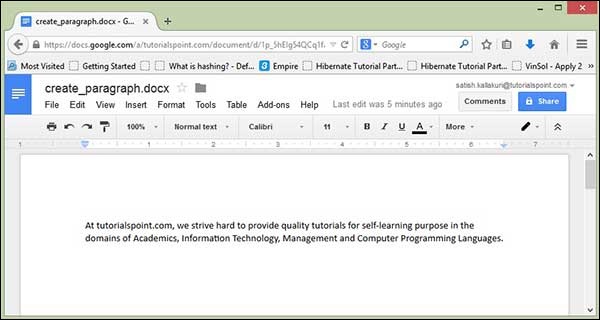
Let us try entering some text into a document. Consider the below text data:At tutorialspoint.com, we strive hard to provide quality tutorials for self-learning purpose in the domains of Academics, Information Technology, Management and Computer Programming Languages.The following code is used to write the above data into a paragraph.
import java.io.File;
import java.io.FileOutputStream;
import org.apache.poi.xwpf.usermodel.XWPFDocument;
import org.apache.poi.xwpf.usermodel.XWPFParagraph;
import org.apache.poi.xwpf.usermodel.XWPFRun;

public class CreateParagraph {
   public static void main(String[] args)throws Exception {
      //Blank Document
      XWPFDocument document= new XWPFDocument();
      //Write the Document in file system
      FileOutputStream out = new FileOutputStream(new File("createparagraph.docx"));

      //create Paragraph
      XWPFParagraph paragraph = document.createParagraph();
      XWPFRun run=paragraph.createRun();
      run.setText("At tutorialspoint.com, we strive hard to " +
         "provide quality tutorials for self-learning " +
         "purpose in the domains of Academics, Information " +
         "Technology, Management and Computer Programming
         Languages.");

      document.write(out);
      out.close();
      System.out.println("createparagraph.docx written successfully");
   }
}
Save the above Java code as CreateParagraph.java, and then compile and run it from the command prompt as follows:
$javac CreateParagraph.java
$java CreateParagraph
It will compile and execute to generate a Word file named createparagraph.docx in your current directory and you will get the following output in the command prompt:
createparagraph.docx written successfullyThe createparagraph.docx file looks as follows.


No comments:
Post a Comment