
JSON or JavaScript Object Notation is a lightweight text-based open
standard designed for human-readable data interchange. Conventions used
by JSON are known to programmers, which include C, C++, Java, Python,
Perl, etc.
 You can refer to JSON Objects chapter for more information on JSON objects.
- JSON stands for JavaScript Object Notation.
- The format was specified by Douglas Crockford.
- It was designed for human-readable data interchange.
- It has been extended from the JavaScript scripting language.
- The filename extension is .json.
- JSON Internet Media type is application/json.
- The Uniform Type Identifier is public.json.
Uses of JSON
- It is used while writing JavaScript based applications that includes browser extensions and websites.
- JSON format is used for serializing and transmitting structured data over network connection.
- It is primarily used to transmit data between a server and web applications.
- Web services and APIs use JSON format to provide public data.
- It can be used with modern programming languages.
Characteristics of JSON
- JSON is easy to read and write.
- It is a lightweight text-based interchange format.
- JSON is language independent.
Simple Example in JSON
The following example shows how to use JSON to store information related to books based on their topic and edition.{ "book": [ { "id":"01", "language": "Java", "edition": "third", "author": "Herbert Schildt" }, { "id":"07", "language": "C++", "edition": "second", "author": "E.Balagurusamy" } ] }After understanding the above program, we will try another example. Let's save the below code as json.htm
<html>
   <head>
      <title>JSON example</title>

      <script language = "javascript" >

         var object1 = { "language" : "Java", "author"  : "herbert schildt" };
         document.write("<h1>JSON with JavaScript example</h1>");
         document.write("<br>");
         document.write("<h3>Language = " + object1.language+"</h3>");
         document.write("<h3>Author = " + object1.author+"</h3>");

         var object2 = { "language" : "C++", "author"  : "E-Balagurusamy" };
         document.write("<br>");
         document.write("<h3>Language = " + object2.language+"</h3>");
         document.write("<h3>Author = " + object2.author+"</h3>");

         document.write("<hr />");
         document.write(object2.language + " programming language can be studied " + "from book written by " + object2.author);
         document.write("<hr />");

      </script>

   </head>

   <body>
   </body>

</html>
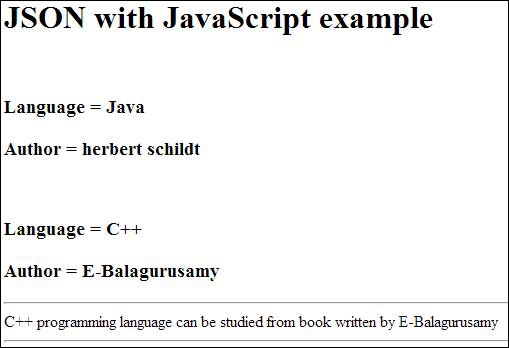
Now let's try to open json.htm using IE or any other javascript enabled browser that produces the following result −
You can refer to JSON Objects chapter for more information on JSON objects.

No comments:
Post a Comment