
In the Previous chapters we have learned how draw a shapes such as
line, triangle, rhombus using JOGL. We draw lines by passing a
predefined field, Gl_lines to glBegin() method.
Other than GL_LINES, the glBegin() method accepts eight more parameters. You can use them to draw different shapes.
These are used the same way as GL_LINES.
The following table shows the glBegin() method parameters along with their description −
Let us see some examples using glBegin() parameters.
Other than GL_LINES, the glBegin() method accepts eight more parameters. You can use them to draw different shapes.
These are used the same way as GL_LINES.
The following table shows the glBegin() method parameters along with their description −
| Sr.No | Parameters and Description |
|---|---|
| 1 | GL_LINES Creates each pair of vertices as an independent line segment. |
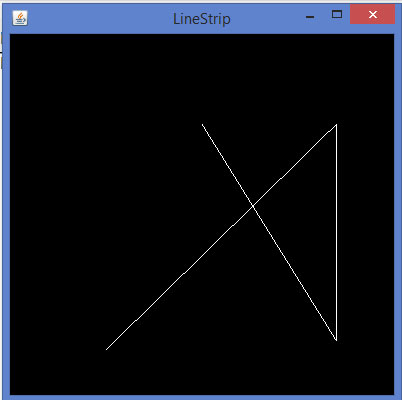
| 2 | GL_LINE_STRIP Draws a connected group of line segments from the first vertex to the last. |
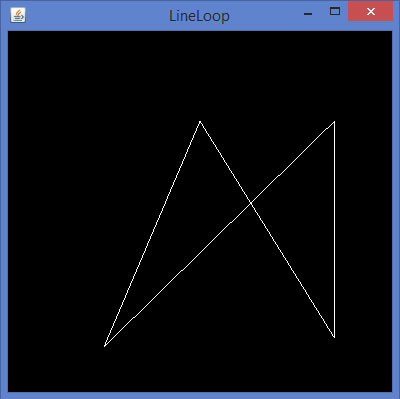
| 3 | GL_LINE_LOOP Draws a connected group of line segments from the first vertex to the last, again back to the first. |
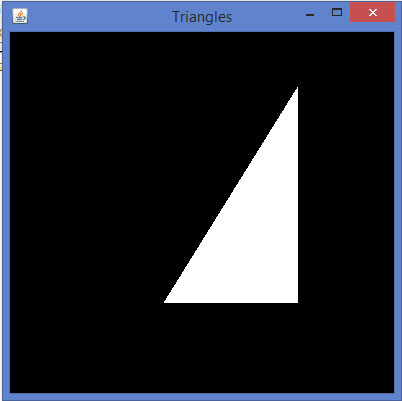
| 4 | GL_TRIANGLES Treats each triplet of vertices as an independent triangle. |
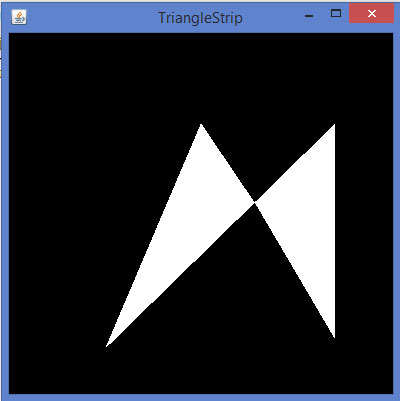
| 5 | GL_TRIANGLE_STRIP Draws a connected group of triangles. One triangle is defined for each vertex presented after the first two vertices. |
| 6 | GL_TRIANGLE_FAN Draws a connected group of triangles. One triangle is defined for each vertex presented after the first two vertices. |
| 7 | GL_QUADS Treats each group of four vertices as an independent quadrilateral. |
| 8 | GL_QUAD_STRIP Draws a connected group of quadrilaterals. One quadrilateral is defined for each pair of vertices presented after the first pair. |
| 9 | GL_POLYGON Draws a single, convex polygon. Vertices 1,…,n define this polygon. |
Program to draw a Line Strip
import javax.media.opengl.GL2;
import javax.media.opengl.GLAutoDrawable;
import javax.media.opengl.GLCapabilities;
import javax.media.opengl.GLEventListener;
import javax.media.opengl.GLProfile;
import javax.media.opengl.awt.GLCanvas;

import javax.swing.JFrame;

public class LineStrip implements GLEventListener {

   @Override
   public void display(GLAutoDrawable drawable) {

      final GL2 gl = drawable.getGL().getGL2();

      gl.glBegin (GL2.GL_LINE_STRIP);
      gl.glVertex3f(-0.50f,-0.75f, 0);
      gl.glVertex3f(0.7f,0.5f, 0);
      gl.glVertex3f(0.70f,-0.70f, 0);
      gl.glVertex3f(0f,0.5f, 0);
      gl.glEnd();
   }

   @Override
   public void dispose(GLAutoDrawable arg0) {
      //method body
   }

   @Override
   public void init(GLAutoDrawable arg0) {
      // method body
   }

   @Override
   public void reshape(GLAutoDrawable arg0, int arg1, int arg2, int arg3, int arg4) {
      // method body
   }

   public static void main(String[] args) {

      //getting the capabilities object of GL2 profile
      final GLProfile profile = GLProfile.get(GLProfile.GL2);
      GLCapabilities capabilities = new GLCapabilities(profile);

      // The canvas
      final GLCanvas glcanvas = new GLCanvas(capabilities);
      LineStrip r = new LineStrip();
      glcanvas.addGLEventListener(r);
      glcanvas.setSize(400, 400);

      //creating frame
      final JFrame frame = new JFrame ("LineStrip");

      //adding canvas to frame
      frame.getContentPane().add(glcanvas);

      frame.setSize(frame.getContentPane().getPreferredSize());
      frame.setVisible(true);

   }//end of main

}//end of classimport javax.media.opengl.GL2;
If you compile and execute the above code, the following output is generated −
Code snippet for display() method to draw a Line Loop
public void display(GLAutoDrawable drawable) {

   final GL2 gl = drawable.getGL().getGL2();

   gl.glBegin (GL2.GL_LINE_LOOP);

   gl.glVertex3f( -0.50f, -0.75f, 0);
   gl.glVertex3f(0.7f, .5f, 0);
   gl.glVertex3f(0.70f, -0.70f, 0);
   gl.glVertex3f(0f, 0.5f, 0);

   gl.glEnd();
}
If you replace the display() method of any of the basic template programs with the above code, compile, and execute it, the following output is generated −
Code snippet for display() method to draw a triangle using GL_TRIANGLES
public void display(GLAutoDrawable drawable) {

   final GL2 gl = drawable.getGL().getGL2();

   gl.glBegin(GL2.GL_TRIANGLES);        // Drawing Using Triangles

   gl.glVertex3f(0.5f,0.7f,0.0f);       // Top
   gl.glVertex3f(-0.2f,-0.50f,0.0f);    // Bottom Left
   gl.glVertex3f(0.5f,-0.5f,0.0f);      // Bottom Right

   gl.glEnd();
}
If you replace the display() method of any of the basic template programs with the above code, compile, and execute it, the following output is generated −
Code snippet for display() method to draw a Triangle Strip
public void display(GLAutoDrawable drawable) {

   final GL2 gl = drawable.getGL().getGL2();

   gl.glBegin (GL2.GL_TRIANGLE_STRIP);

   gl.glVertex3f(0f,0.5f,0);
   gl.glVertex3f(-0.50f,-0.75f,0);
   gl.glVertex3f(0.28f,0.06f,0);
   gl.glVertex3f(0.7f,0.5f,0);
   gl.glVertex3f(0.7f,-0.7f,0);

   gl.glEnd();
}
If you replace the display() method of any of the basic template programs with the above code, compile and execute it, the following output is generated −
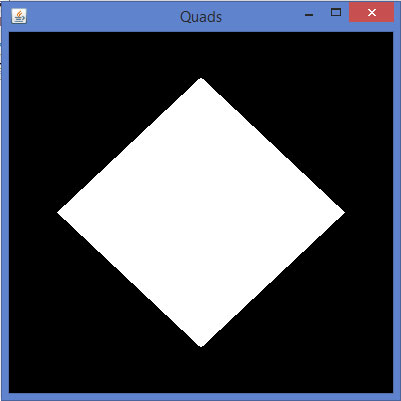
Code snippet for display() method to draw a quadrilateral
public void display(GLAutoDrawable drawable) {

   final GL2 gl = drawable.getGL().getGL2();

   gl.glBegin(GL2.GL_QUADS);

   gl.glVertex3f( 0.0f,0.75f,0);
   gl.glVertex3f(-0.75f,0f,0);
   gl.glVertex3f(0f,-0.75f,0);
   gl.glVertex3f(0.75f,0f,0);

   gl.glEnd();
}
If you replace the display() method of any of the basic template programs with the above code, compile, and execute it, the following output is generated −
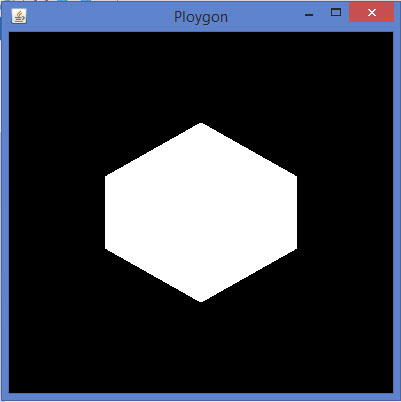
Code snippet for display() method to draw a polygon
public void display(GLAutoDrawable drawable) {

   final GL2 gl = drawable.getGL().getGL2();

   gl.glBegin(GL2.GL_POLYGON);

   gl.glVertex3f(0f,0.5f,0f);
   gl.glVertex3f(-0.5f,0.2f,0f);
   gl.glVertex3f(-0.5f,-0.2f,0f);
   gl.glVertex3f(0f,-0.5f,0f);
   gl.glVertex3f(0f,0.5f,0f);
   gl.glVertex3f(0.5f,0.2f,0f);
   gl.glVertex3f(0.5f,-0.2f,0f);
   gl.glVertex3f(0f,-0.5f,0f);

   gl.glEnd();
}
If you replace display() method of any of the basic template programs with the above code, compile, and execute it, the following output is generated −


No comments:
Post a Comment