Creating Simple Objects
JSON objects can be created with JavaScript. Let us see the various ways of creating JSON objects using JavaScript −
- Creation of an empty Object −
var JSONObj = {};
- Creation of a new Object −
var JSONObj = new Object();
- Creation of an object with attribute bookname with value in string, attribute price with numeric value. Attribute is accessed by using '.' Operator −
var JSONObj = { "bookname ":"VB BLACK BOOK", "price":500 };
This is an example that shows creation of an object in javascript using JSON, save the below code as
json_object.htm
<html>
   <head>
      <title>Creating Object JSON with JavaScript</title>

      <script language = "javascript" >

         var JSONObj = { "name" : "tutorialspoint.com", "year"  : 2005 };

         document.write("<h1>JSON with JavaScript example</h1>");
         document.write("<br>");
         document.write("<h3>Website Name = "+JSONObj.name+"</h3>");
         document.write("<h3>Year = "+JSONObj.year+"</h3>");

      </script>

   </head>

   <body>
   </body>

</html>
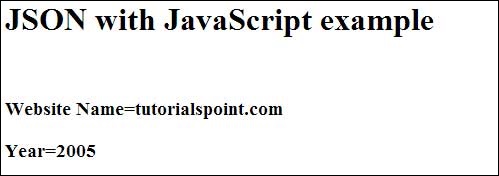
Now let's try to open
Json Object using IE or any other javaScript enabled browser. It produces the following result −
Creating Array Objects
The following example shows creation of an array object in javascript using JSON, save the below code as
json_array_object.htm
<html>
   <head>
      <title>Creation of array object in javascript using JSON</title>

      <script language = "javascript" >

         document.writeln("<h2>JSON array object</h2>");

         var books = { "Pascal" : [
            { "Name"  : "Pascal Made Simple", "price" : 700 },
            { "Name"  : "Guide to Pascal", "price" : 400 }],

            "Scala"  : [
               { "Name"  : "Scala for the Impatient", "price" : 1000 },
               { "Name"  : "Scala in Depth", "price" : 1300 }]
         }

         var i = 0
         document.writeln("<table border = '2'><tr>");

         for(i = 0;i<books.Pascal.length;i++){
            document.writeln("<td>");
            document.writeln("<table border = '1' width = 100 >");
            document.writeln("<tr><td><b>Name</b></td><td width = 50>" + books.Pascal[i].Name+"</td></tr>");
            document.writeln("<tr><td><b>Price</b></td><td width = 50>" + books.Pascal[i].price +"</td></tr>");
            document.writeln("</table>");
            document.writeln("</td>");
         }

         for(i = 0;i<books.Scala.length;i++){
            document.writeln("<td>");
            document.writeln("<table border = '1' width = 100 >");
            document.writeln("<tr><td><b>Name</b></td><td width = 50>" + books.Scala[i].Name+"</td></tr>");
            document.writeln("<tr><td><b>Price</b></td><td width = 50>" + books.Scala[i].price+"</td></tr>");
            document.writeln("</table>");
            document.writeln("</td>");
         }

         document.writeln("</tr></table>");

      </script>

   </head>

   <body>
   </body>

</html>
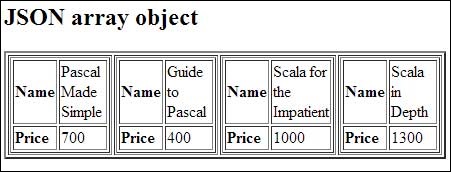
Now let's try to open
Json Array Object using IE or any other javaScript enabled browser. It produces the following result −


No comments:
Post a Comment