
In the Previous chapter we have learned how draw a basic line using JOGL. We draw lines by passing a predefined field, Gl_lines to glBegin() method.
This chapter provides examples to draw shapes like triangle, rhombus and a house, using glBegin() method and GL_Lines.
Let us go through a program to draw a triangle using GL_LINES −
 Let us go through a program to draw a rhombus using GL_LINES −
 Let us go through a program to draw a house using GL_LINES −
This chapter provides examples to draw shapes like triangle, rhombus and a house, using glBegin() method and GL_Lines.
Let us go through a program to draw a triangle using GL_LINES −
import javax.media.opengl.GL2;
import javax.media.opengl.GLAutoDrawable;
import javax.media.opengl.GLCapabilities;
import javax.media.opengl.GLEventListener;
import javax.media.opengl.GLProfile;
import javax.media.opengl.awt.GLCanvas;

import javax.swing.JFrame;

public class Triangle implements GLEventListener {

   @Override
   public void display(GLAutoDrawable drawable) {
      final GL2 gl = drawable.getGL().getGL2();
      gl.glBegin (GL2.GL_LINES);

      //drawing the base
      gl.glBegin (GL2.GL_LINES);
      gl.glVertex3f(-0.50f, -0.50f, 0);
      gl.glVertex3f(0.50f, -0.50f, 0);
      gl.glEnd();

      //drawing the right edge
      gl.glBegin (GL2.GL_LINES);
      gl.glVertex3f(0f, 0.50f, 0);
      gl.glVertex3f(-0.50f, -0.50f, 0);
      gl.glEnd();

      //drawing the lft edge
      gl.glBegin (GL2.GL_LINES);
      gl.glVertex3f(0f, 0.50f, 0);
      gl.glVertex3f(0.50f, -0.50f, 0);
      gl.glEnd();
      gl.glFlush();
   }

   @Override
   public void dispose(GLAutoDrawable arg0) {
      //method body
   }

   @Override
   public void init(GLAutoDrawable arg0) {
      // method body
   }

   @Override
   public void reshape(GLAutoDrawable arg0, int arg1, int arg2, int arg3, int arg4) {
      // method body
   }

   public static void main(String[] args) {

      //getting the capabilities object of GL2 profile
      final GLProfile profile = GLProfile.get(GLProfile.GL2);
      GLCapabilities capabilities = new GLCapabilities(profile);

      // The canvas
      final GLCanvas glcanvas = new GLCanvas(capabilities);
      Triangle l = new Triangle();
      glcanvas.addGLEventListener(l);
      glcanvas.setSize(400, 400);

      //creating frame
      final JFrame frame = new JFrame ("Triangle");

      //adding canvas to frame
      frame.getContentPane().add(glcanvas);

      frame.setSize(frame.getContentPane().getPreferredSize());
      frame.setVisible(true);

   }//end of main

}//end of classimport javax.media.opengl.GL2;
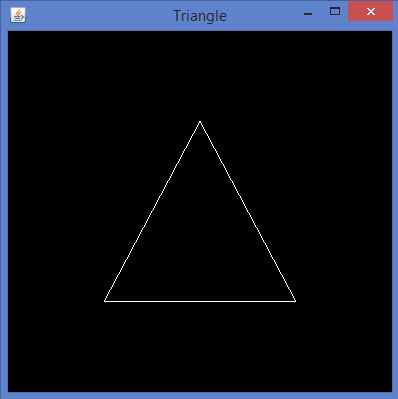
If you compile and execute the above program, the following output is generated. It shows a triangle drawn using GL_LINES of glBegin() method.
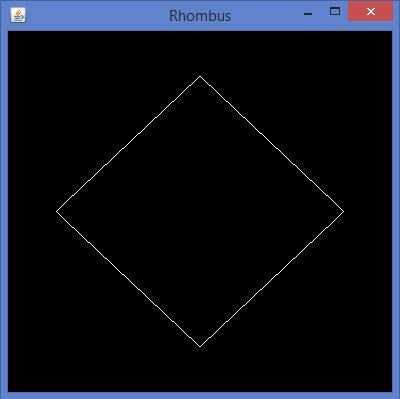
Let us go through a program to draw a rhombus using GL_LINES −import javax.media.opengl.GL2; import javax.media.opengl.GLAutoDrawable; import javax.media.opengl.GLCapabilities; import javax.media.opengl.GLEventListener; import javax.media.opengl.GLProfile; import javax.media.opengl.awt.GLCanvas; import javax.swing.JFrame; public class Rhombus implements GLEventListener { @Override public void display( GLAutoDrawable drawable ) { final GL2 gl = drawable.getGL().getGL2(); //edge1 gl.glBegin( GL2.GL_LINES ); gl.glVertex3f( 0.0f,0.75f,0 ); gl.glVertex3f( -0.75f,0f,0 ); gl.glEnd(); //edge2 gl.glBegin( GL2.GL_LINES ); gl.glVertex3f( -0.75f,0f,0 ); gl.glVertex3f( 0f,-0.75f, 0 ); gl.glEnd(); //edge3 gl.glBegin( GL2.GL_LINES ); gl.glVertex3f( 0f,-0.75f, 0 ); gl.glVertex3f( 0.75f,0f, 0 ); gl.glEnd(); //edge4 gl.glBegin( GL2.GL_LINES ); gl.glVertex3f( 0.75f,0f, 0 ); gl.glVertex3f( 0.0f,0.75f,0 ); gl.glEnd(); gl.glFlush(); } @Override public void dispose( GLAutoDrawable arg0 ) { //method body } @Override public void init(GLAutoDrawable arg0 ) { // method body } @Override public void reshape( GLAutoDrawable arg0, int arg1, int arg2, int arg3, int arg4 ) { // method body } public static void main( String[] args ) { //getting the capabilities object of GL2 profile final GLProfile profile = GLProfile.get( GLProfile.GL2 ); GLCapabilities capabilities = new GLCapabilities(profile); // The canvas final GLCanvas glcanvas = new GLCanvas( capabilities ); Rhombus rhombus = new Rhombus(); glcanvas.addGLEventListener( rhombus ); glcanvas.setSize( 400, 400 ); //creating frame final JFrame frame = new JFrame ( "Rhombus" ); //adding canvas to frame frame.getContentPane().add( glcanvas ); frame.setSize(frame.getContentPane().getPreferredSize() ); frame.setVisible( true ); } }If you compile and execute the above program, you get the following output. It shows a rhombus generated using GL_LINES of glBegin() method.
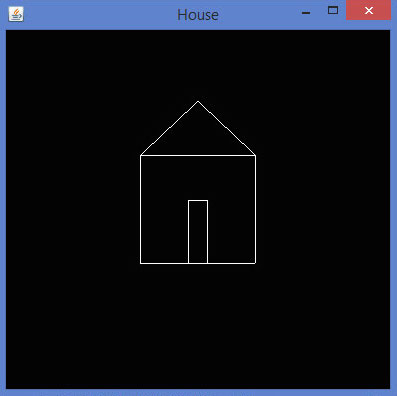
Let us go through a program to draw a house using GL_LINES −import javax.media.opengl.GL2; import javax.media.opengl.GLAutoDrawable; import javax.media.opengl.GLCapabilities; import javax.media.opengl.GLEventListener; import javax.media.opengl.GLProfile; import javax.media.opengl.awt.GLCanvas; import javax.swing.JFrame; public class House implements GLEventListener { @Override public void display( GLAutoDrawable drawable ) { final GL2 gl = drawable.getGL().getGL2(); //drawing top gl.glBegin ( GL2.GL_LINES ); gl.glVertex3f( -0.3f, 0.3f, 0 ); gl.glVertex3f( 0.3f,0.3f, 0 ); gl.glEnd(); //drawing bottom gl.glBegin( GL2.GL_LINES ); gl.glVertex3f( -0.3f,-0.3f, 0 ); gl.glVertex3f( 0.3f,-0.3f, 0 ); gl.glEnd(); //drawing the right edge gl.glBegin( GL2.GL_LINES ); gl.glVertex3f( -0.3f,0.3f, 0 ); gl.glVertex3f( -0.3f,-0.3f, 0 ); gl.glEnd(); //drawing the left edge gl.glBegin( GL2.GL_LINES ); gl.glVertex3f( 0.3f,0.3f,0 ); gl.glVertex3f( 0.3f,-0.3f,0 ); gl.glEnd(); //building roof //building lft dia gl.glBegin( GL2.GL_LINES ); gl.glVertex3f( 0f,0.6f, 0 ); gl.glVertex3f( -0.3f,0.3f, 0 ); gl.glEnd(); //building rt dia gl.glBegin( GL2.GL_LINES ); gl.glVertex3f( 0f,0.6f, 0 ); gl.glVertex3f( 0.3f,0.3f, 0 ); gl.glEnd(); //building door //drawing top gl.glBegin ( GL2.GL_LINES ); gl.glVertex3f( -0.05f, 0.05f, 0 ); gl.glVertex3f( 0.05f, 0.05f, 0 ); gl.glEnd(); //drawing the left edge gl.glBegin ( GL2.GL_LINES ); gl.glVertex3f( -0.05f, 0.05f, 0 ); gl.glVertex3f( -0.05f, -0.3f, 0 ); gl.glEnd(); //drawing the right edge gl.glBegin ( GL2.GL_LINES ); gl.glVertex3f( 0.05f, 0.05f, 0 ); gl.glVertex3f( 0.05f, -0.3f, 0 ); gl.glEnd(); } @Override public void dispose( GLAutoDrawable arg0 ) { //method body } @Override public void init( GLAutoDrawable arg0 ) { // method body } @Override public void reshape( GLAutoDrawable arg0, int arg1, int arg2, int arg3, int arg4 ) { // method body } public static void main( String[] args ) { //getting the capabilities object of GL2 profile final GLProfile profile = GLProfile.get( GLProfile.GL2 ); GLCapabilities capabilities = new GLCapabilities(profile); // The canvas final GLCanvas glcanvas = new GLCanvas( capabilities ); House house = new House(); glcanvas.addGLEventListener( house ); glcanvas.setSize(400, 400); //creating frame final JFrame frame = new JFrame( "House" ); //adding canvas to frame frame.getContentPane().add( glcanvas ); frame.setSize(frame.getContentPane().getPreferredSize() ); frame.setVisible( true ); }//end of main }//end of classIf you compile and execute the above program, you get the following output. It shows a house diagram generated using GL_LINES() method.


No comments:
Post a Comment