The xy chart (scatter) is based on one data series consisting of a
list of x and y values. Each value pair (x,y) is a point in a coordinate
system. Here, one value determines the horizontal (X) position, and the
other determines the vertical (Y) position. This chapter demonstrates
how we can use JFreeChart to create
XY Chart from a given set of business data.
Business Data
Consider an example where we want to create an XY chart for all major
browsers. Here, different performance scores are gathered from
different categories of people as shown below:
| Firefox |
Category(X) |
Score(Y) |
| 1.0 |
1.0 |
| 2.0 |
4.0 |
| 3.0 |
3.0 |
| Chrome |
Category(X) |
Score(Y) |
| 1.0 |
4.0 |
| 2.0 |
5.0 |
| 3.0 |
6.0 |
| IE |
Category(X) |
Score(Y) |
| 3.0 |
4.0 |
| 4.0 |
5.0 |
| 5.0 |
4.0 |
AWT Based Application
Following is the code to create XY Chart from the above given
information. This code helps you embed a XY chart in any AWT based
application.
import java.awt.Color;
import java.awt.BasicStroke;
import org.jfree.chart.ChartPanel;
import org.jfree.chart.JFreeChart;
import org.jfree.data.xy.XYDataset;
import org.jfree.data.xy.XYSeries;
import org.jfree.ui.ApplicationFrame;
import org.jfree.ui.RefineryUtilities;
import org.jfree.chart.plot.XYPlot;
import org.jfree.chart.ChartFactory;
import org.jfree.chart.plot.PlotOrientation;
import org.jfree.data.xy.XYSeriesCollection;
import org.jfree.chart.renderer.xy.XYLineAndShapeRenderer;

public class XYLineChart_AWT extends ApplicationFrame
{
   public XYLineChart_AWT( String applicationTitle, String chartTitle )
   {
      super(applicationTitle);
      JFreeChart xylineChart = ChartFactory.createXYLineChart(
         chartTitle ,
         "Category" ,
         "Score" ,
         createDataset() ,
         PlotOrientation.VERTICAL ,
         true , true , false);

      ChartPanel chartPanel = new ChartPanel( xylineChart );
      chartPanel.setPreferredSize( new java.awt.Dimension( 560 , 367 ) );
      final XYPlot plot = xylineChart.getXYPlot( );
      XYLineAndShapeRenderer renderer = new XYLineAndShapeRenderer( );
      renderer.setSeriesPaint( 0 , Color.RED );
      renderer.setSeriesPaint( 1 , Color.GREEN );
      renderer.setSeriesPaint( 2 , Color.YELLOW );
      renderer.setSeriesStroke( 0 , new BasicStroke( 4.0f ) );
      renderer.setSeriesStroke( 1 , new BasicStroke( 3.0f ) );
      renderer.setSeriesStroke( 2 , new BasicStroke( 2.0f ) );
      plot.setRenderer( renderer );
      setContentPane( chartPanel );
   }

   private XYDataset createDataset( )
   {
      final XYSeries firefox = new XYSeries( "Firefox" );
      firefox.add( 1.0 , 1.0 );
      firefox.add( 2.0 , 4.0 );
      firefox.add( 3.0 , 3.0 );
      final XYSeries chrome = new XYSeries( "Chrome" );
      chrome.add( 1.0 , 4.0 );
      chrome.add( 2.0 , 5.0 );
      chrome.add( 3.0 , 6.0 );
      final XYSeries iexplorer = new XYSeries( "InternetExplorer" );
      iexplorer.add( 3.0 , 4.0 );
      iexplorer.add( 4.0 , 5.0 );
      iexplorer.add( 5.0 , 4.0 );
      final XYSeriesCollection dataset = new XYSeriesCollection( );
      dataset.addSeries( firefox );
      dataset.addSeries( chrome );
      dataset.addSeries( iexplorer );
      return dataset;
   }

   public static void main( String[ ] args )
   {
      XYLineChart_AWT chart = new XYLineChart_AWT("Browser Usage Statistics", "Which Browser are you using?");
      chart.pack( );
      RefineryUtilities.centerFrameOnScreen( chart );
      chart.setVisible( true );
   }
}
Let us keep the above Java code in
XYLineChart_AWT.java file, and then compile and run it from command prompt as follows:
$javac XYLineChart_AWT.java
$java XYLineChart_AWT
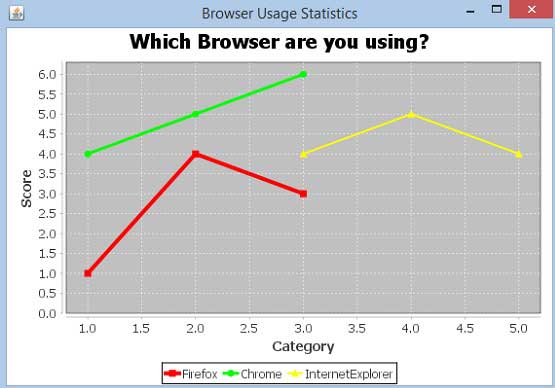
If everything is fine , it will compile and run to generate the following XY Graph :
JPEG Image Creation
Let us re-write above example to generate a JPEG image from command line.
import java.io.*;
import org.jfree.chart.ChartFactory;
import org.jfree.chart.JFreeChart;
import org.jfree.data.xy.XYSeries;
import org.jfree.chart.plot.PlotOrientation;
import org.jfree.data.xy.XYSeriesCollection;
import org.jfree.chart.ChartUtilities;

public class XYLineChart_image
{
   public static void main( String[ ] args )throws Exception
   {
      final XYSeries firefox = new XYSeries( "Firefox" );
      firefox.add( 1.0 , 1.0 );
      firefox.add( 2.0 , 4.0 );
      firefox.add( 3.0 , 3.0 );
      final XYSeries chrome = new XYSeries( "Chrome" );
      chrome.add( 1.0 , 4.0 );
      chrome.add( 2.0 , 5.0 );
      chrome.add( 3.0 , 6.0 );
      final XYSeries iexplorer = new XYSeries( "InternetExplorer" );
      iexplorer.add( 3.0 , 4.0 );
      iexplorer.add( 4.0 , 5.0 );
      iexplorer.add( 5.0 , 4.0 );
      final XYSeriesCollection dataset = new XYSeriesCollection( );
      dataset.addSeries( firefox );
      dataset.addSeries( chrome );
      dataset.addSeries( iexplorer );

      JFreeChart xylineChart = ChartFactory.createXYLineChart(
         "Browser usage statastics",
         "Category",
         "Score",
         dataset,
         PlotOrientation.VERTICAL,
         true, true, false);

      int width = 640; /* Width of the image */
      int height = 480; /* Height of the image */
      File XYChart = new File( "XYLineChart.jpeg" );
      ChartUtilities.saveChartAsJPEG( XYChart, xylineChart, width, height);
   }
}
Let us keep the above Java code in
XYLineChart_image.java file, and then compile and run it from command prompt as follows :
$javac XYLineChart_image.java
$java XYLineChart_image
If everything is fine , it will compile and run to create JPEG image file named
XYLineChart.jpeg in your current directory.


No comments:
Post a Comment