
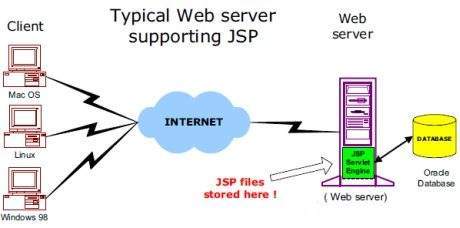
The web server needs a JSP engine ie. container to process JSP pages.
The JSP container is responsible for intercepting requests for JSP
pages. This tutorial makes use of Apache which has built-in JSP
container to support JSP pages development.
A JSP container works with the Web server to provide the runtime environment and other services a JSP needs. It knows how to understand the special elements that are part of JSPs.
Following diagram shows the position of JSP container and JSP files in a Web Application.
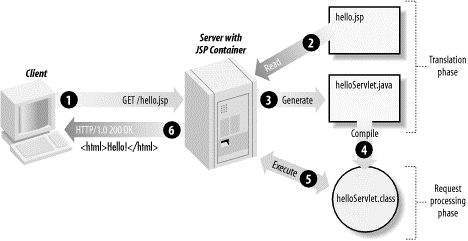
Typically, the JSP engine checks to see whether a servlet for a JSP
file already exists and whether the modification date on the JSP is
older than the servlet. If the JSP is older than its generated servlet,
the JSP container assumes that the JSP hasn't changed and that the
generated servlet still matches the JSP's contents. This makes the
process more efficient than with other scripting languages (such as PHP)
and therefore faster.
So in a way, a JSP page is really just another way to write a servlet without having to be a Java programming wiz. Except for the translation phase, a JSP page is handled exactly like a regular servlet
A JSP container works with the Web server to provide the runtime environment and other services a JSP needs. It knows how to understand the special elements that are part of JSPs.
Following diagram shows the position of JSP container and JSP files in a Web Application.
JSP Processing:
The following steps explain how the web server creates the web page using JSP:- As with a normal page, your browser sends an HTTP request to the web server.
- The web server recognizes that the HTTP request is for a JSP page and forwards it to a JSP engine. This is done by using the URL or JSP page which ends with .jsp instead of .html.
- The JSP engine loads the JSP page from disk and converts it into a servlet content. This conversion is very simple in which all template text is converted to println( ) statements and all JSP elements are converted to Java code that implements the corresponding dynamic behavior of the page.
- The JSP engine compiles the servlet into an executable class and forwards the original request to a servlet engine.
- A part of the web server called the servlet engine loads the Servlet class and executes it. During execution, the servlet produces an output in HTML format, which the servlet engine passes to the web server inside an HTTP response.
- The web server forwards the HTTP response to your browser in terms of static HTML content.
- Finally web browser handles the dynamically generated HTML page inside the HTTP response exactly as if it were a static page.
So in a way, a JSP page is really just another way to write a servlet without having to be a Java programming wiz. Except for the translation phase, a JSP page is handled exactly like a regular servlet


No comments:
Post a Comment