
In previous chapter we have seen how to draw 3d shapes, this chapter teaches you how to draw 3d triangle and rotate it.
Below given is the program to draw a 3d triangle an rotate it.
 To make the triangle solid, you need to enable depth test by using glEnable(GL_DEPTH_TEST). Enabling the depth buffer gives you a blank
screen. This can be cleared by clearing the color using glClear(GL_COLOR_BUFFERBIT | GL_DEPTH_BUFFER_BIT) method. To enable depth test in the init() method or in the glDisplay() method, write the following code −
To make the triangle solid, you need to enable depth test by using glEnable(GL_DEPTH_TEST). Enabling the depth buffer gives you a blank
screen. This can be cleared by clearing the color using glClear(GL_COLOR_BUFFERBIT | GL_DEPTH_BUFFER_BIT) method. To enable depth test in the init() method or in the glDisplay() method, write the following code −
Here, you can see the snapshots of a rotating 3D triangle. Since this program includes code for depth test, the triangle is generated solid.
Below given is the program to draw a 3d triangle an rotate it.
import javax.media.opengl.GL2;
import javax.media.opengl.GLAutoDrawable;
import javax.media.opengl.GLCapabilities;
import javax.media.opengl.GLEventListener;
import javax.media.opengl.GLProfile;
import javax.media.opengl.awt.GLCanvas;
import javax.media.opengl.glu.GLU;

import javax.swing.JFrame;

import com.jogamp.opengl.util.FPSAnimator;

public class Triangle3d implements GLEventListener {

   private GLU glu = new GLU();
   private float rtri = 0.0f;

   @Override
   public void display(GLAutoDrawable drawable) {
      final GL2 gl = drawable.getGL().getGL2();

      // Clear The Screen And The Depth Buffer
      gl.glClear( GL2.GL_COLOR_BUFFER_BIT | GL2.GL_DEPTH_BUFFER_BIT );
      gl.glLoadIdentity(); // Reset The View
      gl.glTranslatef( -0.5f, 0.0f, -6.0f ); // Move the triangle
      gl.glRotatef( rtri, 0.0f, 1.0f, 0.0f );
      gl.glBegin( GL2.GL_TRIANGLES );

      //drawing triangle in all dimensions
      // Front
      gl.glColor3f( 1.0f, 0.0f, 0.0f ); // Red
      gl.glVertex3f( 1.0f, 2.0f, 0.0f ); // Top Of Triangle (Front)

      gl.glColor3f( 0.0f, 1.0f, 0.0f ); // Green
      gl.glVertex3f( -1.0f, -1.0f, 1.0f ); // Left Of Triangle (Front)

      gl.glColor3f( 0.0f, 0.0f, 1.0f ); // Blue
      gl.glVertex3f( 1.0f, -1.0f, 1.0f ); // Right Of Triangle (Front)

      // Right
      gl.glColor3f( 1.0f, 0.0f, 0.0f ); // Red
      gl.glVertex3f( 1.0f, 2.0f, 0.0f ); // Top Of Triangle (Right)

      gl.glColor3f( 0.0f, 0.0f, 1.0f ); // Blue
      gl.glVertex3f( 1.0f, -1.0f, 1.0f ); // Left Of Triangle (Right)

      gl.glColor3f( 0.0f, 1.0f, 0.0f ); // Green
      gl.glVertex3f( 1.0f, -1.0f, -1.0f ); // Right Of Triangle (Right)

      // Left
      gl.glColor3f( 1.0f, 0.0f, 0.0f ); // Red
      gl.glVertex3f( 1.0f, 2.0f, 0.0f ); // Top Of Triangle (Back)

      gl.glColor3f( 0.0f, 1.0f, 0.0f ); // Green
      gl.glVertex3f( 1.0f, -1.0f, -1.0f ); // Left Of Triangle (Back)

      gl.glColor3f( 0.0f, 0.0f, 1.0f ); // Blue
      gl.glVertex3f( -1.0f, -1.0f, -1.0f ); // Right Of Triangle (Back)

      //left
      gl.glColor3f( 0.0f, 1.0f, 0.0f ); // Red
      gl.glVertex3f( 1.0f, 2.0f, 0.0f ); // Top Of Triangle (Left)

      gl.glColor3f( 0.0f, 0.0f, 1.0f ); // Blue
      gl.glVertex3f( -1.0f, -1.0f, -1.0f ); // Left Of Triangle (Left)

      gl.glColor3f( 0.0f, 1.0f, 0.0f ); // Green
      gl.glVertex3f( -1.0f, -1.0f, 1.0f ); // Right Of Triangle (Left)

      gl.glEnd(); // Done Drawing 3d triangle (Pyramid)
      gl.glFlush();
      rtri += 0.2f;
   }

   @Override
   public void dispose( GLAutoDrawable drawable ) {
      //method body
   }

   @Override
   public void init( GLAutoDrawable drawable ) {
      //method body
   }

   @Override
   public void reshape( GLAutoDrawable drawable, int x, int y, int width, int height ) {

      // TODO Auto-generated method stub
      final GL2 gl = drawable.getGL().getGL2();
      if(height lt;=;)
         height = 1;

      final float h = ( float ) width / ( float ) height;
      gl.glViewport( 0, 0, width, height );
      gl.glMatrixMode( GL2.GL_PROJECTION );
      gl.glLoadIdentity();

      glu.gluPerspective( 45.0f, h, 1.0, 20.0 );
      gl.glMatrixMode( GL2.GL_MODELVIEW );
      gl.glLoadIdentity();
   }

   public static void main( String[] args ) {

      // TODO Auto-generated method stub
      final GLProfile profile = GLProfile.get( GLProfile.GL2 );
      GLCapabilities capabilities = new GLCapabilities( profile );

      // The canvas
      final GLCanvas glcanvas = new GLCanvas( capabilities );
      Triangle3d triangle = new Triangle3d();

      glcanvas.addGLEventListener( triangle );
      glcanvas.setSize( 400, 400 );

      final JFrame frame = new JFrame ( "3d Triangle (shallow)" );

      frame.getContentPane().add( glcanvas );
      frame.setSize( frame.getContentPane().getPreferredSize() );
      frame.setVisible( true );

      final FPSAnimator animator = new FPSAnimator(glcanvas,300,true);
      animator.start();
   }

}
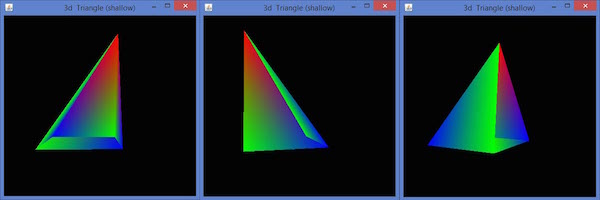
When you compile and execute the above program, the following output is generated. Here, you have the snapshots of rotating 3D triangle. Since this program does not includes depth test, the triangle is generated hollow.
To make the triangle solid, you need to enable depth test by using glEnable(GL_DEPTH_TEST). Enabling the depth buffer gives you a blank
screen. This can be cleared by clearing the color using glClear(GL_COLOR_BUFFERBIT | GL_DEPTH_BUFFER_BIT) method. To enable depth test in the init() method or in the glDisplay() method, write the following code −public void init(GLAutoDrawable drawable) { final GL2 gl = drawable.getGL().getGL2(); gl.glShadeModel(GL2.GL_SMOOTH); gl.glClearColor(0f, 0f, 0f, 0f); gl.glClearDepth(1.0f); gl.glEnable(GL2.GL_DEPTH_TEST); gl.glDepthFunc(GL2.GL_LEQUAL); gl.glHint(GL2.GL_PERSPECTIVE_CORRECTION_HINT, GL2.GL_NICEST); }Below given is the Program to draw a 3D triangle with depth test.
import javax.media.opengl.GL2;
import javax.media.opengl.GLAutoDrawable;
import javax.media.opengl.GLCapabilities;
import javax.media.opengl.GLEventListener;
import javax.media.opengl.GLProfile;
import javax.media.opengl.awt.GLCanvas;
import javax.media.opengl.glu.GLU;

import javax.swing.JFrame;

import com.jogamp.opengl.util.FPSAnimator;

public class Triangledepthtest implements GLEventListener {

   private GLU glu = new GLU();
   private float rtri = 0.0f;

   @Override
   public void display( GLAutoDrawable drawable ) {

      final GL2 gl = drawable.getGL().getGL2();

      gl.glShadeModel( GL2.GL_SMOOTH );
      gl.glClearColor( 0f, 0f, 0f, 0f );
      gl.glClearDepth( 1.0f );
      gl.glEnable( GL2.GL_DEPTH_TEST );
      gl.glDepthFunc( GL2.GL_LEQUAL );
      gl.glHint(GL2.GL_PERSPECTIVE_CORRECTION_HINT, GL2.GL_NICEST);

      // Clear The Screen And The Depth Buffer
      gl.glClear(GL2.GL_COLOR_BUFFER_BIT | GL2.GL_DEPTH_BUFFER_BIT);
      gl.glLoadIdentity(); // Reset The View
      gl.glTranslatef( -0.5f,0.0f,-6.0f ); // Move the triangle
      gl.glRotatef( rtri, 0.0f, 1.0f, 0.0f );
      gl.glBegin( GL2.GL_TRIANGLES );

      //drawing triangle in all dimensions
      //front
      gl.glColor3f( 1.0f, 0.0f, 0.0f ); // Red
      gl.glVertex3f( 1.0f, 2.0f, 0.0f ); // Top

      gl.glColor3f( 0.0f, 1.0f, 0.0f ); // Green
      gl.glVertex3f( -1.0f, -1.0f, 1.0f ); // Left

      gl.glColor3f( 0.0f, 0.0f, 1.0f ); // Blue
      gl.glVertex3f( 1.0f, -1.0f, 1.0f ); // Right)

      //right
      gl.glColor3f( 1.0f, 0.0f, 0.0f );
      gl.glVertex3f( 1.0f, 2.0f, 0.0f ); // Top

      gl.glColor3f( 0.0f, 0.0f, 1.0f );
      gl.glVertex3f( 1.0f, -1.0f, 1.0f ); // Left

      gl.glColor3f( 0.0f, 1.0f, 0.0f );
      gl.glVertex3f( 1.0f, -1.0f, -1.0f ); // Right

      //left
      gl.glColor3f( 1.0f, 0.0f, 0.0f );
      gl.glVertex3f( 1.0f, 2.0f, 0.0f ); // Top

      gl.glColor3f( 0.0f, 1.0f, 0.0f );
      gl.glVertex3f( 1.0f, -1.0f, -1.0f ); // Left

      gl.glColor3f( 0.0f, 0.0f, 1.0f );
      gl.glVertex3f( -1.0f, -1.0f, -1.0f ); // Right

      //top
      gl.glColor3f( 0.0f, 1.0f, 0.0f );
      gl.glVertex3f( 1.0f, 2.0f, 0.0f ); // Top

      gl.glColor3f( 0.0f, 0.0f, 1.0f );
      gl.glVertex3f( -1.0f, -1.0f, -1.0f ); // Left

      gl.glColor3f( 0.0f, 1.0f, 0.0f );
      gl.glVertex3f( -1.0f, -1.0f, 1.0f ); // Right

      gl.glEnd(); // Done Drawing 3d triangle (Pyramid)

      gl.glFlush();
      rtri += 0.2f;
   }

   @Override
   public void dispose( GLAutoDrawable drawable ) {
   }

   @Override
   public void init( GLAutoDrawable drawable ) {

      final GL2 gl = drawable.getGL().getGL2();

      gl.glShadeModel( GL2.GL_SMOOTH );
      gl.glClearColor( 0f, 0f, 0f, 0f );
      gl.glClearDepth( 1.0f );
      gl.glEnable( GL2.GL_DEPTH_TEST );
      gl.glDepthFunc( GL2.GL_LEQUAL );
      gl.glHint(GL2.GL_PERSPECTIVE_CORRECTION_HINT, GL2.GL_NICEST );
   }

   @Override
   public void reshape(GLAutoDrawable drawable, int x, int y, int width, int height ) {

      // TODO Auto-generated method stub
      final GL2 gl = drawable.getGL().getGL2();
      if( height <= 0 )
         height = 1;

      final float h = ( float ) width / ( float ) height;
      gl.glViewport( 0, 0, width, height );
      gl.glMatrixMode( GL2.GL_PROJECTION );
      gl.glLoadIdentity();

      glu.gluPerspective( 45.0f, h, 1.0, 20.0 );
      gl.glMatrixMode( GL2.GL_MODELVIEW );
      gl.glLoadIdentity();
   }

   public static void main( String[] args ) {

      // TODO Auto-generated method stub
      final GLProfile profile = GLProfile.get( GLProfile.GL2 );
      GLCapabilities capabilities = new GLCapabilities( profile );

      // The canvas
      final GLCanvas glcanvas = new GLCanvas( capabilities );
      Triangledepthtest triangledepthtest = new Triangledepthtest();

      glcanvas.addGLEventListener( triangledepthtest );
      glcanvas.setSize( 400, 400 );

      final JFrame frame = new JFrame ( "3d Triangle (solid)" );
      frame.getContentPane().add(glcanvas);
      frame.setSize( frame.getContentPane().getPreferredSize() );
      frame.setVisible( true );
      final FPSAnimator animator = new FPSAnimator( glcanvas, 300,true);

      animator.start();
   }

}
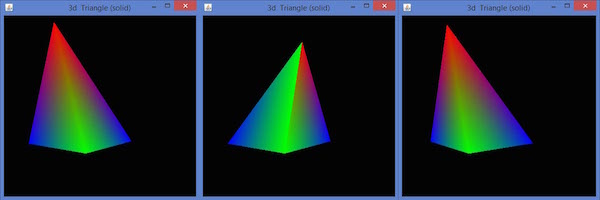
When you compile and execute the above program, the following output is generated.
Here, you can see the snapshots of a rotating 3D triangle. Since this program includes code for depth test, the triangle is generated solid.


No comments:
Post a Comment