পৃষ্ঠাসমূহ

Search Your Article

CS


Welcome to GoogleDG – your one-stop destination for free learning resources, guides, and digital tools.

At GoogleDG, we believe that knowledge should be accessible to everyone. Our mission is to provide readers with valuable ebooks, tutorials, and tech-related content that makes learning easier, faster, and more enjoyable.

What We Offer:

  • 📘 Free & Helpful Ebooks – covering education, technology, self-development, and more.

  • 💻 Step-by-Step Tutorials – practical guides on digital tools, apps, and software.

  • 🌐 Tech Updates & Tips – simplified information to keep you informed in the fast-changing digital world.

  • 🎯 Learning Support – resources designed to support students, professionals, and lifelong learners.

    Latest world News 


Our Vision

To create a digital knowledge hub where anyone, from beginners to advanced learners, can find trustworthy resources and grow their skills.

Why Choose Us?

✔ Simple explanations of complex topics
✔ 100% free access to resources
✔ Regularly updated content
✔ A community that values knowledge sharing

We are continuously working to expand our content library and provide readers with the most useful and relevant digital learning materials.

📩 If you’d like to connect, share feedback, or suggest topics, feel free to reach us through the Contact page.

Pageviews

Friday, January 20, 2017

jMeter - JMS Test Plan

In this chapter, we will learn how to write a simple test plan to test Java Messaging Service (JMS). JMS supports two types of messaging −
  • Point-to-Point messaging − Queue messaging is generally used for transactions where the sender expects a response. Messaging systems are quite different from normal HTTP requests. In HTTP, a single user sends a request and gets a response.
  • Topic messaging − Topic messages are commonly known as pub/sub messaging. Topic messaging is generally used in cases where a message is published by a producer and consumed by multiple subscribers.
Let us see a test example for each of these. The pre-requisites for testing JMS are −
  • We use Apache ActiveMQ in the example. There are various JMS servers like IBM WebSphere MQ (formerly MQSeries), Tibco, etc. Download it from the binaries from the Apache ActiveMQ website.
  • Unzip the archive, go to the decompressed directory, and run the following command from the command console to start the ActiveMQ server −
.\bin\activemq  start
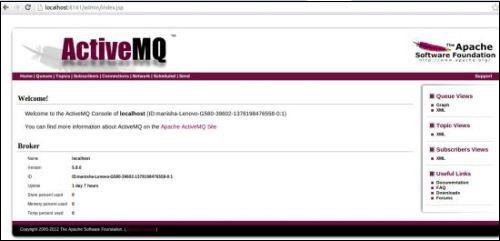
You can verify if the ActiveMQ server has started by visiting the admin interface at the following address http://localhost:8161/admin/. If it asks for authentication, then enter the userid and password as admin. The screen is similar as shown below −
ActiveMQ Server
  • Now copy the activemq-all-x.x.x.jar (XXX depending on the version) from the ActiveMQ unzipped directory to /home/manisha/apache-jmeter-2.9/lib.
With the above setup, let us build the test plan for −

No comments:

Post a Comment