
In this chapter, you will learn how to apply border to a paragraph using Java programming.
Applying Border
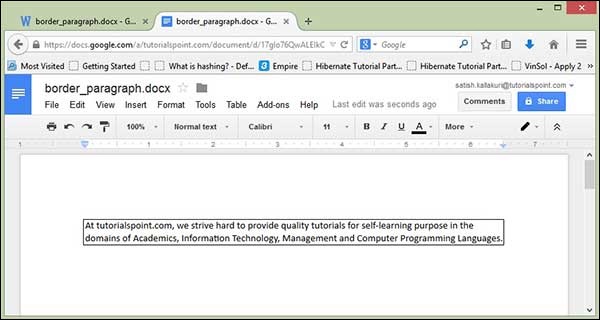
The following code is used to apply Borders in a Document:import java.io.File; import java.io.FileOutputStream; import org.apache.poi.xwpf.usermodel.Borders; import org.apache.poi.xwpf.usermodel.XWPFDocument; import org.apache.poi.xwpf.usermodel.XWPFParagraph; import org.apache.poi.xwpf.usermodel.XWPFRun; public class ApplyingBorder { public static void main(String[] args)throws Exception { //Blank Document XWPFDocument document= new XWPFDocument(); //Write the Document in file system FileOutputStream out = new FileOutputStream(new File("applyingborder.docx")); //create paragraph XWPFParagraph paragraph = document.createParagraph(); //Set bottom border to paragraph paragraph.setBorderBottom(Borders.BASIC_BLACK_DASHES); //Set left border to paragraph paragraph.setBorderLeft(Borders.BASIC_BLACK_DASHES); //Set right border to paragraph paragraph.setBorderRight(Borders.BASIC_BLACK_DASHES); //Set top border to paragraph paragraph.setBorderTop(Borders.BASIC_BLACK_DASHES); XWPFRun run=paragraph.createRun(); run.setText("At tutorialspoint.com, we strive hard to " + "provide quality tutorials for self-learning " + "purpose in the domains of Academics, Information " + "Technology, Management and Computer Programming " + "Languages."); document.write(out); out.close(); System.out.println("applyingborder.docx written successully"); } }Save the above code in a file named ApplyingBorder.java, compile and execute it from the command prompt as follows:
$javac ApplyingBorder.java
$java ApplyingBorder
If your system is configured with the POI library, then it will compile and execute to generate a Word document named applyingborder.docx in your current directory and display the following output:
applyingborder.docx written successfullyThe applyingborder.docx file looks as follows:


No comments:
Post a Comment