
A time series chart displays sequence of data points, which varies at
equal intervals of time. This chapter demonstrates how we can use
JFreeChart to create Time Series Chart from a given set of business data.
Business Data
Let us consider various random numbers generated by using standard Java API Math.random(). We use these numbers to generate a Time Series Chart. You can generate similar chart for total number of errors occurring in your website at a given interval of time.AWT Based Application
Following is the code to create Time Series Chart from the numbers generated by Math.random() at a given time internal.import org.jfree.chart.ChartFactory; import org.jfree.chart.ChartPanel; import org.jfree.chart.JFreeChart; import org.jfree.data.general.SeriesException; import org.jfree.data.time.Second; import org.jfree.data.time.TimeSeries; import org.jfree.data.time.TimeSeriesCollection; import org.jfree.data.xy.XYDataset; import org.jfree.ui.ApplicationFrame; import org.jfree.ui.RefineryUtilities; public class TimeSeries_AWT extends ApplicationFrame { public TimeSeries_AWT( final String title ) { super( title ); final XYDataset dataset = createDataset( ); final JFreeChart chart = createChart( dataset ); final ChartPanel chartPanel = new ChartPanel( chart ); chartPanel.setPreferredSize( new java.awt.Dimension( 560 , 370 ) ); chartPanel.setMouseZoomable( true , false ); setContentPane( chartPanel ); } private XYDataset createDataset( ) { final TimeSeries series = new TimeSeries( "Random Data" ); Second current = new Second( ); double value = 100.0; for (int i = 0; i < 4000; i++) { try { value = value + Math.random( ) - 0.5; series.add(current, new Double( value ) ); current = ( Second ) current.next( ); } catch ( SeriesException e ) { System.err.println("Error adding to series"); } } return new TimeSeriesCollection(series); } private JFreeChart createChart( final XYDataset dataset ) { return ChartFactory.createTimeSeriesChart( "Computing Test", "Seconds", "Value", dataset, false, false, false); } public static void main( final String[ ] args ) { final String title = "Time Series Management"; final TimeSeries_AWT demo = new TimeSeries_AWT( title ); demo.pack( ); RefineryUtilities.positionFrameRandomly( demo ); demo.setVisible( true ); } }Let us keep the above Java code in TimeSeries_AWT.java file, and then compile and run it from command prompt as follows :
$javac TimeSeries_AWT.java
$java TImeSeries_AWT
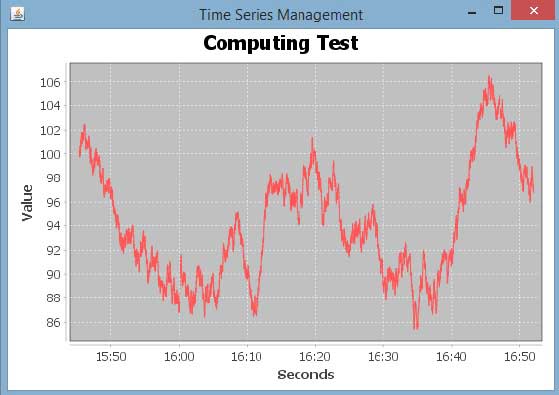
If everything is fine , it will compile and run to generate the following Time Series Graph :
JPEG Image Creation
Let us re-write above example to generate a JPEG image from command line.import java.io.*; import org.jfree.chart.ChartFactory; import org.jfree.chart.JFreeChart; import org.jfree.data.general.SeriesException; import org.jfree.data.time.Second; import org.jfree.data.time.TimeSeries; import org.jfree.data.time.TimeSeriesCollection; import org.jfree.data.xy.XYDataset; import org.jfree.chart.ChartUtilities; public class TimeSeriesChart { public static void main( final String[ ] args )throws Exception { final TimeSeries series = new TimeSeries( "Random Data" ); Second current = new Second(); double value = 100.0; for ( int i = 0 ; i < 4000 ; i++ ) { try { value = value + Math.random( ) - 0.5; series.add( current , new Double( value ) ); current = ( Second ) current.next( ); } catch ( SeriesException e ) { System.err.println( "Error adding to series" ); } } final XYDataset dataset=( XYDataset )new TimeSeriesCollection(series); JFreeChart timechart = ChartFactory.createTimeSeriesChart( "Computing Test", "Seconds", "Value", dataset, false, false, false); int width = 560; /* Width of the image */ int height = 370; /* Height of the image */ File timeChart = new File( "TimeChart.jpeg" ); ChartUtilities.saveChartAsJPEG( timeChart, timechart, width, height ); } }Let us keep above Java code in TimeSeriesChart.java file, and then compile and run it from command prompt as follows :
$javac TimeSeriesChart.java
$java TimeSeriesChart
If everything is fine with your environment, it will compile and run to create JPEG image file TimeChart.jpeg file in your current directory.


No comments:
Post a Comment