
The webview tag is used to embed 'guest' content like web pages in
your Electron app. This content is contained within the webview
container. An embedded page within your app controls how this content
will be displayed.
The webview runs in a separate process than your app. To ensure security from malicious content, the webview doesn't have same permissions as your web page. This keeps your app safe from the embedded content. All interactions between your app and embedded page will be asynchronous.
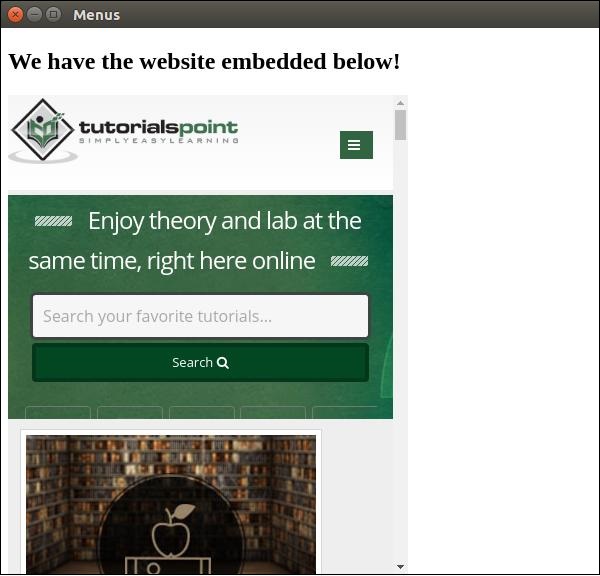
Lets see an example of embedding an external webpage in pur electron app. We will embed the tutorialspoint website in our app on the right side. Create a new main.js file with the following content:
 The webview tag can be used for other resources as well. The webview
element has a list of event that it emits listed on the official docs.
You can use these events to improve functionality depending on the
things that take place in the webview.
The webview tag can be used for other resources as well. The webview
element has a list of event that it emits listed on the official docs.
You can use these events to improve functionality depending on the
things that take place in the webview.
Whenever you're embedding scripts or other resources from the internet, it is advisable to use webview. Doing so has great security benefits without hindering any normal behaviour.
The webview runs in a separate process than your app. To ensure security from malicious content, the webview doesn't have same permissions as your web page. This keeps your app safe from the embedded content. All interactions between your app and embedded page will be asynchronous.
Lets see an example of embedding an external webpage in pur electron app. We will embed the tutorialspoint website in our app on the right side. Create a new main.js file with the following content:
const {app, BrowserWindow} = require('electron')
const url = require('url')
const path = require('path')

let win

function createWindow() {
   win = new BrowserWindow({width: 800, height: 600})
   win.loadURL(url.format({
      pathname: path.join(__dirname, 'index.html'),
      protocol: 'file:',
      slashes: true
   }))
}

app.on('ready', createWindow)
Now that we've setup our main process, lets create the HTML file that'll embed the tutorialspoint website. Create a file called index.html with the following content:
<!DOCTYPE html>
<html>
   <head>
      <meta charset="UTF-8">
      <title>Menus</title>
   </head>
   <body>
      <div>
         <div>
            <h2>We have the website embedded below!</h2>
         </div>
         <webview id="foo" src="https://www.tutorialspoint.com/" style="width:400px; height:480px;">
            <div class="indicator"></div>
         </webview>
      </div>
      <script type="text/javascript">
      // Event handlers for loading events.
      // Use these to handle loading screens, transitions, etc
      onload = () => {
         const webview = document.getElementById('foo')
         const indicator = document.querySelector('.indicator')

         const loadstart = () => {
            indicator.innerText = 'loading...'
         }

         const loadstop = () => {
            indicator.innerText = ''
         }

         webview.addEventListener('did-start-loading', loadstart)
         webview.addEventListener('did-stop-loading', loadstop)
      }
      </script>
   </body>
</html>
Run the app using:
$ electron ./main.jsYou should get the output:
The webview tag can be used for other resources as well. The webview
element has a list of event that it emits listed on the official docs.
You can use these events to improve functionality depending on the
things that take place in the webview. Whenever you're embedding scripts or other resources from the internet, it is advisable to use webview. Doing so has great security benefits without hindering any normal behaviour.


No comments:
Post a Comment