
Electron provides native notifications API only for MacOS. So we are
not going to use that, instead we'll be using a npm module called node-notifier. It allows us to notify users on Windows, MacOS and Linux.
Install the node-notifier module in your app folder using the following command in that folder:
Create a new main.js file and enter the following code in it:
Now when you run this app using:
 We have also handled the events in case the user clicks the
notification or the notification times out. These methods help us make
the app more interactive if its running in the background.
We have also handled the events in case the user clicks the
notification or the notification times out. These methods help us make
the app more interactive if its running in the background.
Install the node-notifier module in your app folder using the following command in that folder:
$ npm install --save node-notifierNow let's create an app that has a button that'll generate a notification every time we click on this button.
Create a new main.js file and enter the following code in it:
const {app, BrowserWindow} = require('electron')
const url = require('url')
const path = require('path')

let win

function createWindow() {
   win = new BrowserWindow({width: 800, height: 600})
   win.loadURL(url.format({
      pathname: path.join(__dirname, 'index.html'),
      protocol: 'file:',
      slashes: true
   }))
}

app.on('ready', createWindow)
Now lets create our webpage and script that'll trigger the notification. Create a new index.html file with the following code:
<!DOCTYPE html>
<html>
   <head>
      <meta charset="UTF-8">
      <title>Menus</title>
   </head>
   <body>
      <button type="button" id="notify" name="button">Click here to trigger a notification!</button>
      <script type="text/javascript">
         const notifier = require('node-notifier')
         const path = require('path');
         document.getElementById('notify').onclick = (event) => {
            notifier.notify({
               title: 'My awesome title',
               message: 'Hello from electron, Mr. User!',
               icon: path.join('','/home/ayushgp/Desktop/images.png'), // Absolute path (doesn't work on balloons)
               sound: true, // Only Notification Center or Windows Toasters
               wait: true // Wait with callback, until user action is taken against notification
            }, function (err, response) {
               // Response is response from notification
            });

            notifier.on('click', function (notifierObject, options) {
               console.log("You clicked on the notification")
            });

            notifier.on('timeout', function (notifierObject, options) {
               console.log("Notification timed out!")
            });
         }
      </script>
   </body>
</html>
The notify method allows us to pass it an objectwith information like the title, message, thumbnail, etc which help us customize the notification. We can also set some event listeners on the notification.
Now when you run this app using:
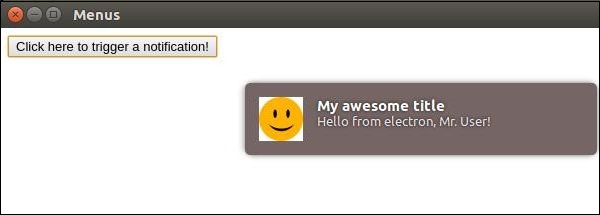
$ electron ./main.jsWhen you click on the button that we created, you'll see a native notification from your operating system which will look something like:
We have also handled the events in case the user clicks the
notification or the notification times out. These methods help us make
the app more interactive if its running in the background.

No comments:
Post a Comment