
We have created a package.json file for our project. Now we'll create our first desktop app using electron.
Create a new file called main.js. Enter the following code in it:
We defined a createWindow function where we are creating a new BrowserWindow and attaching a URL to this BrowserWindow. This is the HTML file that is rendered and shown to us when we run the app.
Note that we also used a native electron object here called process in our html file. This object is extended from the Node.js process object and includes all of t=its functionalities while adding many more.
Create a new file called main.js. Enter the following code in it:
const {app, BrowserWindow} = require('electron')
const url = require('url')
const path = require('path')

let win

function createWindow() {
   win = new BrowserWindow({width: 800, height: 600})
   win.loadURL(url.format({
      pathname: path.join(__dirname, 'index.html'),
      protocol: 'file:',
      slashes: true
   }))
}

app.on('ready', createWindow)
Create another file, this time an HTML file called index.html. Enter the following code in it.
<!DOCTYPE html>
<html>
   <head>
      <meta charset="UTF-8">
      <title>Hello World!</title>
   </head>
   <body>
      <h1>Hello World!</h1>
      We are using node <script>document.write(process.versions.node)</script>,
      Chrome <script>document.write(process.versions.chrome)</script>,
      and Electron <script>document.write(process.versions.electron)</script>.
   </body>
</html>
Run this app using the following command:
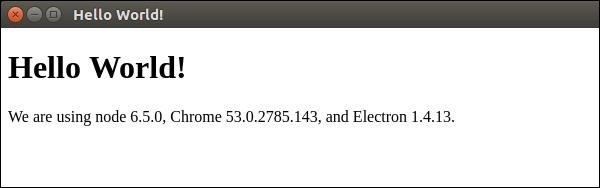
$ electron ./main.jsA new window will open up. It'll look like the following:
How does this App Work?
We created a main file and a html file. The main file uses 2 modules app and BrowserWindow. The app module is used to control your application’s event lifecycle while the BrowserWindow module is used to create and control browser windows.We defined a createWindow function where we are creating a new BrowserWindow and attaching a URL to this BrowserWindow. This is the HTML file that is rendered and shown to us when we run the app.
Note that we also used a native electron object here called process in our html file. This object is extended from the Node.js process object and includes all of t=its functionalities while adding many more.


No comments:
Post a Comment