
The User Interface of Electron apps is built using HTML, CSS and JS.
So we can leverage all the available tools for front end web development
here as well. You can use the tools like Angular, Backbone, React, etc
as well as Bootstrap, Foundation, etc to build the apps.
You can use Bower to manage these frontend dependencies. Install bower using:
Now lets install jquery using npm:
We already have a main.js setup as follows:
 You can build your native app just like you build websites. If you
dont want users to be restricted to an exact window size, you can
leverage responsive design and allow users to use your app in a flexible
manner.
You can build your native app just like you build websites. If you
dont want users to be restricted to an exact window size, you can
leverage responsive design and allow users to use your app in a flexible
manner.
You can use Bower to manage these frontend dependencies. Install bower using:
$ npm install -g bowerNow you can get all the available JS and CSS frameworks, libraries, plugins, etc using bower. For example, to get the latest stable version of bootstrap, just enter:
$ bower install bootstrap
This will download bootstrap in bower_components. Now you can reference this library in your HTML.
Let's create a simple page using these libraries. Now lets install jquery using npm:
$ npm install --save jqueryThis can now be required in our view.js file.
We already have a main.js setup as follows:
const {app, BrowserWindow} = require('electron')
const url = require('url')
const path = require('path')

let win

function createWindow() {
   win = new BrowserWindow({width: 800, height: 600})
   win.loadURL(url.format({
      pathname: path.join(__dirname, 'index.html'),
      protocol: 'file:',
      slashes: true
   }))
}

app.on('ready', createWindow)
Open your index.html file and enter the following code in it:
<!DOCTYPE html>
<html>
   <head>
      <meta charset="UTF-8">
      <title>Hello World!</title>
      <link rel="stylesheet" href="./bower_components/bootstrap/dist/css/bootstrap.min.css" />
   </head>
   <body>
      <div class="container">
         <h1>This page is using Bootstrap and jQuery!</h1>
         <h3 id="click-counter"></h3>
         <button class="btn btn-success" id="countbtn">Click here</button>
         <script src="./view.js" ></script>
      </div>
   </body>
</html>
Create view.js and enter the click counter logic in it:
let $ = require('jquery')  // jQuery now loaded and assigned to $
let count = 0
$('#click-counter').text(count.toString())
$('#countbtn').on('click', () => {
   count ++
   $('#click-counter').text(count)
})
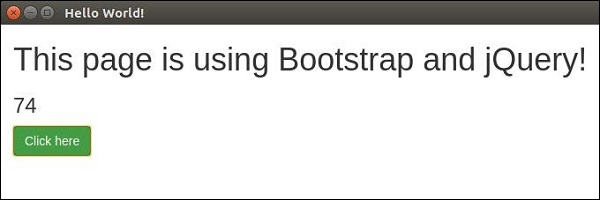
Run the app using:
$ electron ./main.jsYou should get the output:
You can build your native app just like you build websites. If you
dont want users to be restricted to an exact window size, you can
leverage responsive design and allow users to use your app in a flexible
manner.

No comments:
Post a Comment