
In this chapter let us study about how to Publish content.
Every content is either published or unpublished. Published content will
be seen by everyone where as unpublished content will not be seen. We
can make use of this to hide the content from public view without
deleting it.
Following are the simple steps used to enable or disable publishing options for contents.
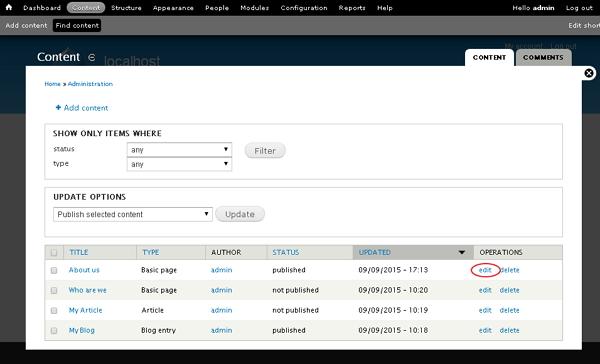
Step(1): Click on the Content as shown below.
 Step(2):Next, you can select any of the content, let us choose About us(About us page was created in the chapter Drupal - Create Content), and click on the edit as shown below.
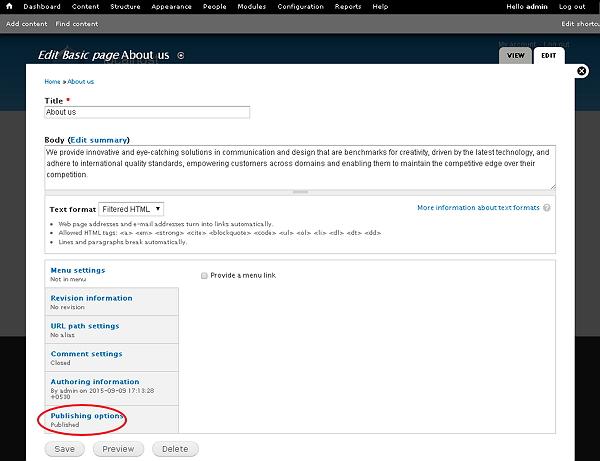
 Step(3):Next, click Publishing options as shown below
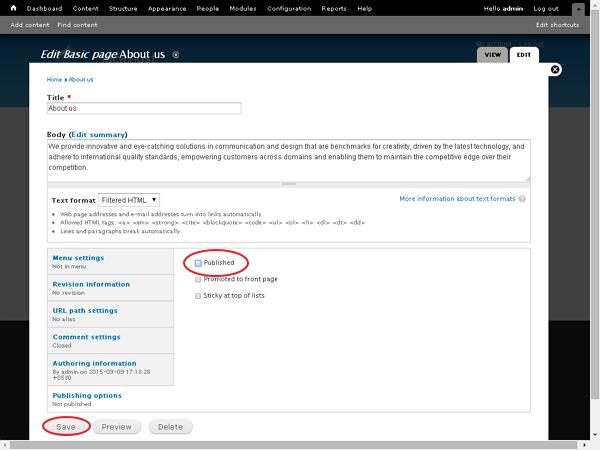
 Step(4): Next, check the box of Published option and click Save button as shown below.
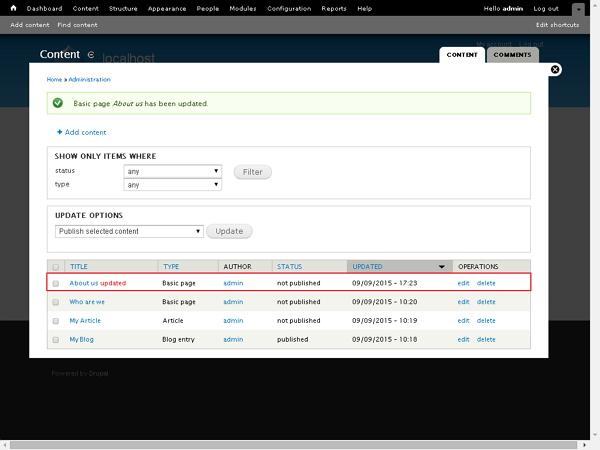
 Below, we have mentioned the details about the fields present in above screen.
Following are the simple steps used to enable or disable publishing options for contents.
Step(1): Click on the Content as shown below.
Step(2):Next, you can select any of the content, let us choose About us(About us page was created in the chapter Drupal - Create Content), and click on the edit as shown below.
Step(3):Next, click Publishing options as shown below
Step(4): Next, check the box of Published option and click Save button as shown below.
Below, we have mentioned the details about the fields present in above screen.- Published: It specifies to publish your page.
- Promoted to front page: It displays your page on front page of your website
- Sticky at top of lists: It displays your article or page etc at the top from the lists


No comments:
Post a Comment