
In this chapter let us study about Deleting content. You can delete any of the previously written content such as Articles, Basic page and Blog entry.
Following are the simple steps used to delete content.
Step(1): Click on the Content as shown below.
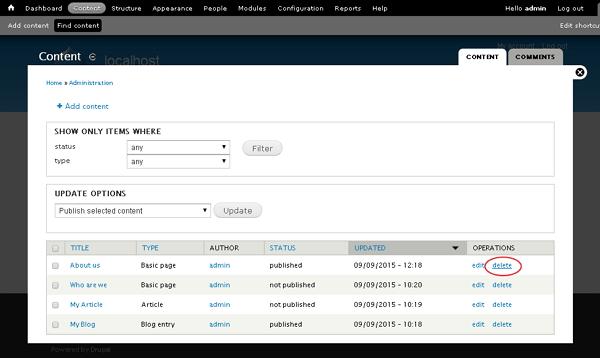
 Step(2): Next, you can delete About us(About us page was created in the chapter Drupal - Create Content), and click on the delete as shown below
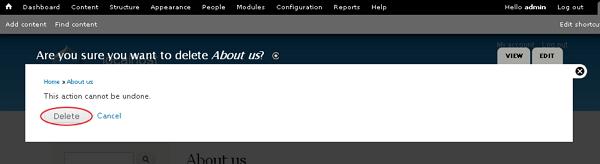
 Step(3): Next, you will see the below screen. You need to confirm deletion of the content. Click on Delete button, if you want to delete or Cancel button, if you want to cancel the process.
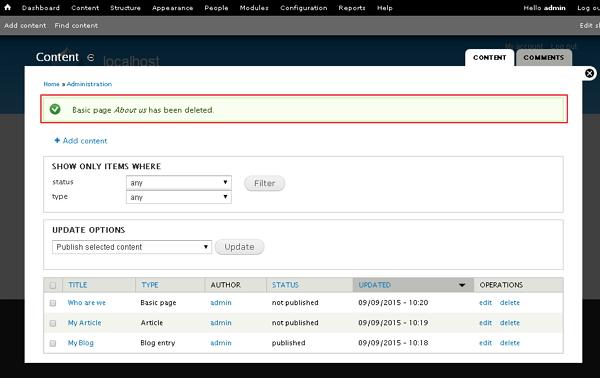
 Step(4):Immediately, you will see a confirmation message as your page has been deleted, as shown below.
Following are the simple steps used to delete content.
Step(1): Click on the Content as shown below.
Step(2): Next, you can delete About us(About us page was created in the chapter Drupal - Create Content), and click on the delete as shown below
Step(3): Next, you will see the below screen. You need to confirm deletion of the content. Click on Delete button, if you want to delete or Cancel button, if you want to cancel the process.
Step(4):Immediately, you will see a confirmation message as your page has been deleted, as shown below.

No comments:
Post a Comment