
In this chapter let us study about, how to create Front Page
in Drupal.If you have a good content on your website and expect your
visitor to see that particular content first, then that article must be
on the front page. Here Drupal provides solution for this.
Following are the simple steps used for creating Drupal Front Page.
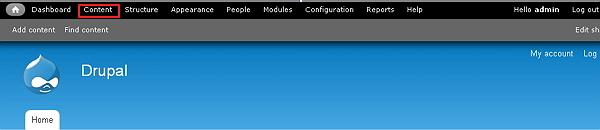
Step (1): Click on Content as shown below.
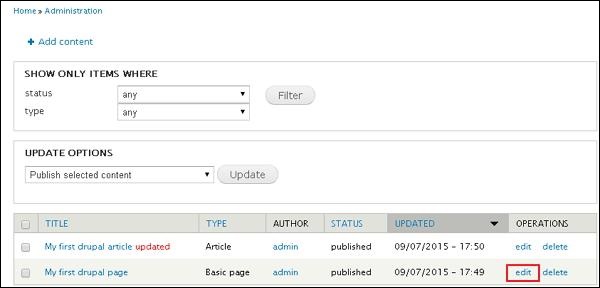
 Step (2): Next, you will see the list of articles and pages on screen. Click on edit link as shown below.
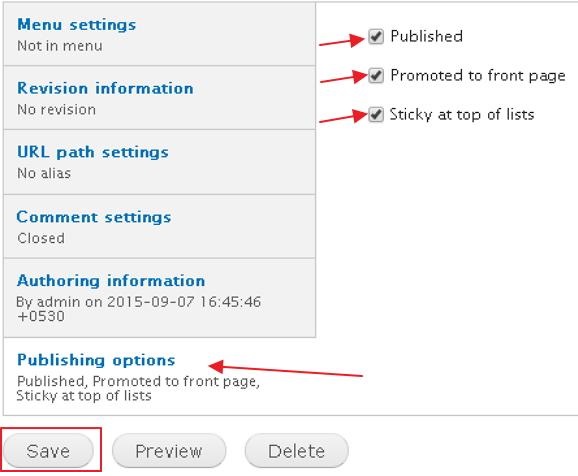
 Step (3): Next, click on Publishing option and check mark all the boxes as shown below.
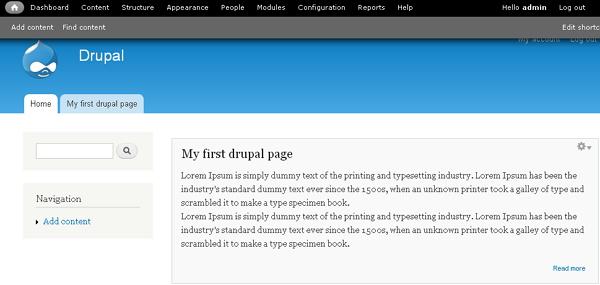
Step (4): Next, you will see your page on the front page of your website as shown below.
Following are the simple steps used for creating Drupal Front Page.
Step (1): Click on Content as shown below.
Step (2): Next, you will see the list of articles and pages on screen. Click on edit link as shown below.
Step (3): Next, click on Publishing option and check mark all the boxes as shown below.
- Published: Publish your page or article by marking the check box
- Promoted to front page: Promote your page or article, to the front page of your website.
- Sticky at top of lists: Fixes your page at top of lists on your site.
Step (4): Next, you will see your page on the front page of your website as shown below.


No comments:
Post a Comment