
In this chapter we will learn about Drupal Extensions. To extend the functionality of the site different extensions can be installed.
Following are the steps to install Extension module in Drupal.
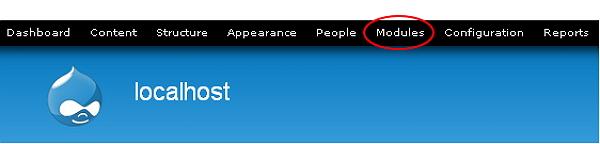
Step (1): Click on Modules from the menu bar.
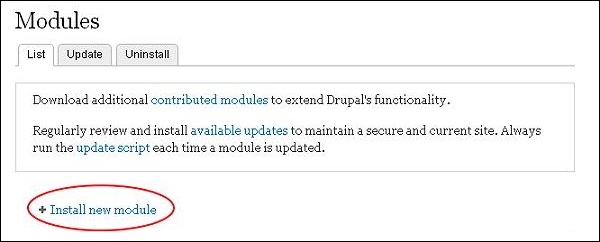
 Step (2): Next, click on Install new module.
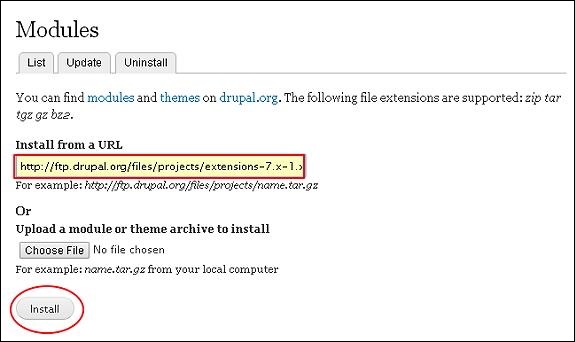
 Step (3): Next, the following page gets displayed. Here, enter the module URL in the box as shown in the below image and click on Install.
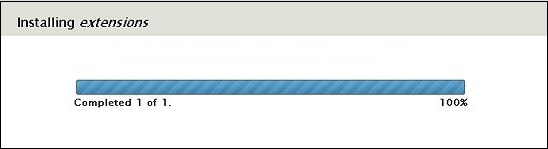
 Step (4): The module starts getting installed as shown below.
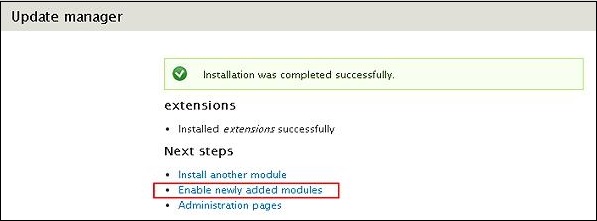
 Step (5): Once installation is complete you get the screen as shown below. Here, click on Enable newly added modules link.
 Step (6): Next, a Module page gets displayed where your module has been installed, now you can enable the module.

Following are the steps to install Extension module in Drupal.
Step (1): Click on Modules from the menu bar.
Step (2): Next, click on Install new module.
Step (3): Next, the following page gets displayed. Here, enter the module URL in the box as shown in the below image and click on Install.
Step (4): The module starts getting installed as shown below.
Step (5): Once installation is complete you get the screen as shown below. Here, click on Enable newly added modules link.
Step (6): Next, a Module page gets displayed where your module has been installed, now you can enable the module.

No comments:
Post a Comment