
Many cPanel web hosting comes with this ClamAV virus scanner feature
to guard against potential threats on your server. You can run on-demand
scan of your files to see if they are infected with any virus or not.
ClamAV is an open source powerful antivirus, it uses its extensive database to detect several types of potential threats like viruses, Trojan horses, malwares, malicious scripts etc.
You can scan different sectors of your home directory using the antivirus. To scan your account with a virus scanner, use the following steps.
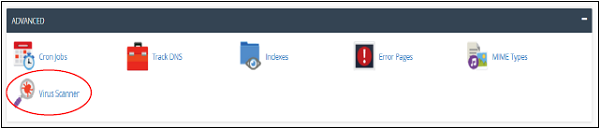
Step 1 − Open cPanel Virus Scanner by clicking the Virus Scanner link in the Advanced section of the cPanel home.
 Step 2 − You can choose the scan type from here.
 If the Virus Scanner finds any malicious software, then it will give
you options to correct the error. You may choose the option accordingly.
If the Virus Scanner finds any malicious software, then it will give
you options to correct the error. You may choose the option accordingly.
ClamAV is an open source powerful antivirus, it uses its extensive database to detect several types of potential threats like viruses, Trojan horses, malwares, malicious scripts etc.
You can scan different sectors of your home directory using the antivirus. To scan your account with a virus scanner, use the following steps.
Step 1 − Open cPanel Virus Scanner by clicking the Virus Scanner link in the Advanced section of the cPanel home.
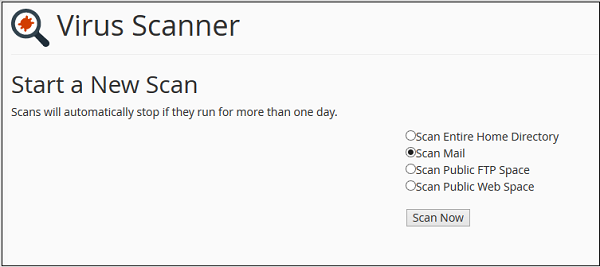
Step 2 − You can choose the scan type from here.
- Scan Entire Home Directory − This option will scan your entire cPanel account. If you choose this option, no need to run the scan on other options. This will scan your home directory, which contains the Emails, FTP accounts and Website.
- Scan Mail − This option will scan your emails for viruses. If somebody sends a malicious email having some virus or malware, this virus scanner will tell you that.
- Scan Public FTP Space − This option will scan your public_ftp folder. If somebody uploaded a malicious file through FTP, virus scanner will find it.
- Scan Public Web Space − This option will scan your public_html in which all your front end files reside.
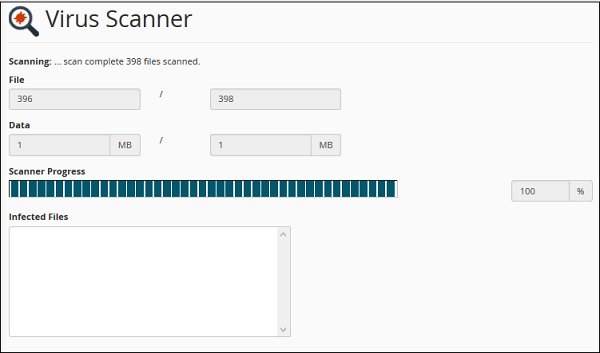
If the Virus Scanner finds any malicious software, then it will give
you options to correct the error. You may choose the option accordingly.

No comments:
Post a Comment