
MIME (Multi–Purpose Internet Mail Extensions) types tell the browsers
how to handle certain types of files. When a file is sent to a browser
of your website’s visitor, it also sends the MIME type of that file with
that too. The MIME type tells the browser about the type of file and
how the file will be served to the user.
For example, if a .js file is sent to the browser then application/JavaScript MIME type is also sent to tell the browser that the .js file is a JavaScript file, and browser handles the file accordingly.
Most of the MIME type are defined in a system defined MIME types. But if you have a file with custom extension, you can specify MIME type for that file in this interface. This will tell the browser about your custom extension and how to handle that file.
To add a custom MIME type, please follow these steps −
Step 1 − Open cPanel MIME Types by clicking on MIME Types in Advanced Section of cPanel.
 Step 2 − In Create A MIME Type interface, Enter your MIME type.
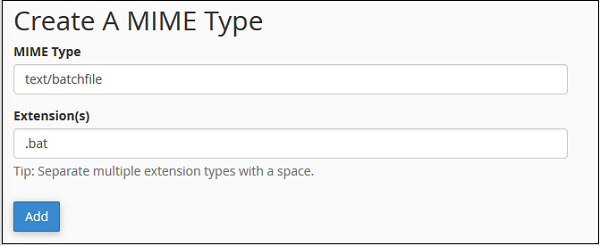 Step 3 − Enter the extension for your file. If you have
multiple extensions, you can add all of them at once by separating them
with a space.
Step 3 − Enter the extension for your file. If you have
multiple extensions, you can add all of them at once by separating them
with a space.
Step 4 − Click on Add button to save the custom MIME type.
 It will ask for confirmation; click Delete MIME Type to delete a user defined MIME type.
For example, if a .js file is sent to the browser then application/JavaScript MIME type is also sent to tell the browser that the .js file is a JavaScript file, and browser handles the file accordingly.
Most of the MIME type are defined in a system defined MIME types. But if you have a file with custom extension, you can specify MIME type for that file in this interface. This will tell the browser about your custom extension and how to handle that file.
To add a custom MIME type, please follow these steps −
Step 1 − Open cPanel MIME Types by clicking on MIME Types in Advanced Section of cPanel.
Step 2 − In Create A MIME Type interface, Enter your MIME type.
Step 3 − Enter the extension for your file. If you have
multiple extensions, you can add all of them at once by separating them
with a space.Step 4 − Click on Add button to save the custom MIME type.
Delete a MIME Type
You can only delete the MIME Types defined by you. As, you are not allowed to delete the MIME types, which are defined by the System automatically. To delete a MIME type, Scroll down to the User Defined MIME Types and Click Delete link corresponding to the MIME type you want to delete.
It will ask for confirmation; click Delete MIME Type to delete a user defined MIME type.

No comments:
Post a Comment