
You can use this interface of cPanel to find out the general DNS of a
domain. It will give you the IP address of that domain, mail servers
and raw DNS information. This can be useful to retrieve network
information.
To lookup a domain, use the following steps −
Step 1 − Open cPanel Track DNS by clicking Track DNS link found under the Advanced section of cPanel.
 Step 2 − In the Domain lookup interface, enter the domain, which you want to look up.
 Step 3 − Press Look Up button to lookup a DNS of a domain.
You will get information in the following manner.
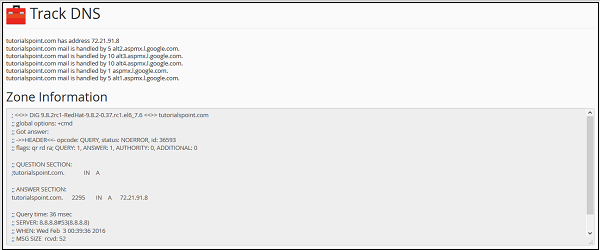 The top-most line provides the IP address of the domain. The other
following lines tells about the mail servers. In Zone Information, you
will see the raw DNS information of the domain.
The top-most line provides the IP address of the domain. The other
following lines tells about the mail servers. In Zone Information, you
will see the raw DNS information of the domain.
 To trace the route of your computer and the server, scroll down to
see Trace Route interface. Click Trace to get the information of the
route between your webserver and you.
To trace the route of your computer and the server, scroll down to
see Trace Route interface. Click Trace to get the information of the
route between your webserver and you.
Domain Lookup
This tool retrieves the IP address of the domain and displays email hosts used by the domain. It also displays the raw DNS data of the domain.To lookup a domain, use the following steps −
Step 1 − Open cPanel Track DNS by clicking Track DNS link found under the Advanced section of cPanel.
Step 2 − In the Domain lookup interface, enter the domain, which you want to look up.
Step 3 − Press Look Up button to lookup a DNS of a domain.You will get information in the following manner.
The top-most line provides the IP address of the domain. The other
following lines tells about the mail servers. In Zone Information, you
will see the raw DNS information of the domain.Trace Route
Another function in cPanel Track DNS is the trace route. This function of Track DNS gives you information of the route between the computer in which the user is logged in and the server, where your website is hosted.
To trace the route of your computer and the server, scroll down to
see Trace Route interface. Click Trace to get the information of the
route between your webserver and you.

No comments:
Post a Comment