
This chapter shows how to apply different font styles and alignments
in a Word document using Java. Generally, Font Style contains: Font
size, Type, Bold, Italic, and Underline. And Alignment is categorized
into left, center, right, and justify.
Font Style
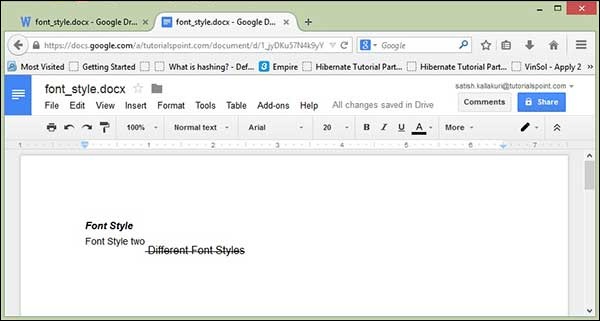
The following code is used to set different styles of font:import java.io.File; import java.io.FileOutputStream; import org.apache.poi.xwpf.usermodel.VerticalAlign; import org.apache.poi.xwpf.usermodel.XWPFDocument; import org.apache.poi.xwpf.usermodel.XWPFParagraph; import org.apache.poi.xwpf.usermodel.XWPFRun; public class FontStyle { public static void main(String[] args)throws Exception { //Blank Document XWPFDocument document= new XWPFDocument(); //Write the Document in file system FileOutputStream out = new FileOutputStream(new File("fontstyle.docx")); //create paragraph XWPFParagraph paragraph = document.createParagraph(); //Set Bold an Italic XWPFRun paragraphOneRunOne = paragraph.createRun(); paragraphOneRunOne.setBold(true); paragraphOneRunOne.setItalic(true); paragraphOneRunOne.setText("Font Style"); paragraphOneRunOne.addBreak(); //Set text Position XWPFRun paragraphOneRunTwo = paragraph.createRun(); paragraphOneRunTwo.setText("Font Style two"); paragraphOneRunTwo.setTextPosition(100); //Set Strike through and Font Size and Subscript XWPFRun paragraphOneRunThree = paragraph.createRun(); paragraphOneRunThree.setStrike(true); paragraphOneRunThree.setFontSize(20); paragraphOneRunThree.setSubscript(VerticalAlign.SUBSCRIPT); paragraphOneRunThree.setText(" Different Font Styles"); document.write(out); out.close(); System.out.println("fontstyle.docx written successully"); } }Save the above code as FontStyle.java and then compile and execute it from the command prompt as follows:
$javac FontStyle.java
$java FontStyle
It will generate a Word file named fontstyle.docx in your current directory and display the following output on the command prompt:
fontstyle.docx written successfullyThe fontstyle.docx file looks as follows.
Alignment
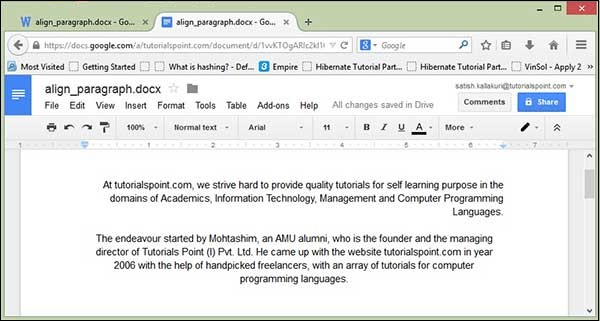
The following code is used to set alignment to the paragraph text:import java.io.File; import java.io.FileOutputStream; import org.apache.poi.xwpf.usermodel.ParagraphAlignment; import org.apache.poi.xwpf.usermodel.XWPFDocument; import org.apache.poi.xwpf.usermodel.XWPFParagraph; import org.apache.poi.xwpf.usermodel.XWPFRun; public class AlignParagraph { public static void main(String[] args)throws Exception { //Blank Document XWPFDocument document= new XWPFDocument(); //Write the Document in file system FileOutputStream out = new FileOutputStream( new File("alignparagraph.docx")); //create paragraph XWPFParagraph paragraph = document.createParagraph(); //Set alignment paragraph to RIGHT paragraph.setAlignment(ParagraphAlignment.RIGHT); XWPFRun run=paragraph.createRun(); run.setText("At tutorialspoint.com, we strive hard to " + "provide quality tutorials for self-learning " + "purpose in the domains of Academics, Information " + "Technology, Management and Computer Programming " + "Languages."); //Create Another paragraph paragraph=document.createParagraph(); //Set alignment paragraph to CENTER paragraph.setAlignment(ParagraphAlignment.CENTER); run=paragraph.createRun(); run.setText("The endeavour started by Mohtashim, an AMU " + "alumni, who is the founder and the managing director " + "of Tutorials Point (I) Pvt. Ltd. He came up with the " + "website tutorialspoint.com in year 2006 with the help" + "of handpicked freelancers, with an array of tutorials" + " for computer programming languages. "); document.write(out); out.close(); System.out.println("alignparagraph.docx written successfully"); } }Save the above code as AlignParagraph.java and then compile and execute it from the command prompt as follows:
$javac AlignParagraph.java
$java AlignParagraph
It will generate a Word file named alignparagraph.docx in your current directory and display the following output in the command prompt:
alignparagraph.docx written successfullyThe alignparagraph.docx file looks as follows:


No comments:
Post a Comment