
Bundling and Minification are two performance improvement techniques that improves the request load time of the application. Most of the current major browsers limit the number of simultaneous connections per hostname to six. It means that at a time, all the additional requests will be queued by the browser.
Bundling is a simple logical group of files that could be referenced by unique name and loaded with a single HTTP request.
By default, the MVC application's BundleConfig (located inside App_Start folder) comes with the following code −
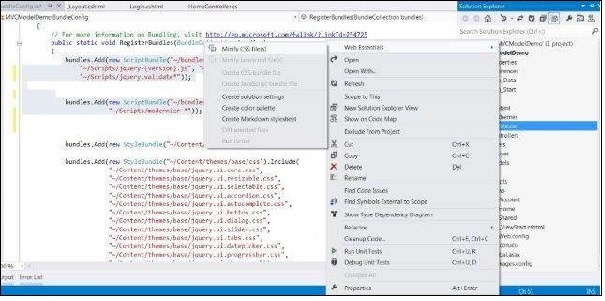 So if you had a css file named Site.css, it will create its minified version as Site.min.css.
Now when the next time your application will run in the browser, it will bundle and minify all the css and js files, hence improving the application performance.
Enabling Bundling and Minification
To enable bundling and minification in your MVC application, open the Web.config file inside your solution. In this file search for compilation settings under system.web:<system.web> <compilation debug = "true" /> </system.web>By default, you will see the debug parameter set to true which means that bundling and minification is disabled. Set this parameter to false.
Bundling
To improve the performance of the application, ASP.NET MVC provides inbuilt feature to bundle multiple files into a single file which in turn improves the page load performance because of fewer HTTP requests.Bundling is a simple logical group of files that could be referenced by unique name and loaded with a single HTTP request.
By default, the MVC application's BundleConfig (located inside App_Start folder) comes with the following code −
public static void RegisterBundles(BundleCollection bundles) {
   // Following is the sample code to bundle all the css files in the project
   // The code to bundle other javascript files will also be similar to this

   bundles.Add(new StyleBundle("~/Content/themes/base/css").Include(
      "~/Content/themes/base/jquery.ui.core.css",
      "~/Content/themes/base/jquery.ui.tabs.css",
      "~/Content/themes/base/jquery.ui.datepicker.css",
      "~/Content/themes/base/jquery.ui.progressbar.css",
      "~/Content/themes/base/jquery.ui.theme.css"));
}
The above code basically bundles all the CSS files present in Content/themes/base folder into a single file.
Minification
Minification is another such performance improvement technique in which it optimizes the javascript, css code by shortening the variable names, removing unnecessary white spaces, line breaks and comments, etc. This in turn reduces the file size and helps the application to load faster.Minification with Visual Studio and Web Essentials Extension
For using this option, you will have to first install the Web Essentials Extension in your Visual Studio. After that, when you will right click on any css or javascript file, it will show you the option to create a minified version of that file.
So if you had a css file named Site.css, it will create its minified version as Site.min.css.Now when the next time your application will run in the browser, it will bundle and minify all the css and js files, hence improving the application performance.


No comments:
Post a Comment