
Express uses the Debug module to internally log information about route matching, middleware functions, application mode, etc.
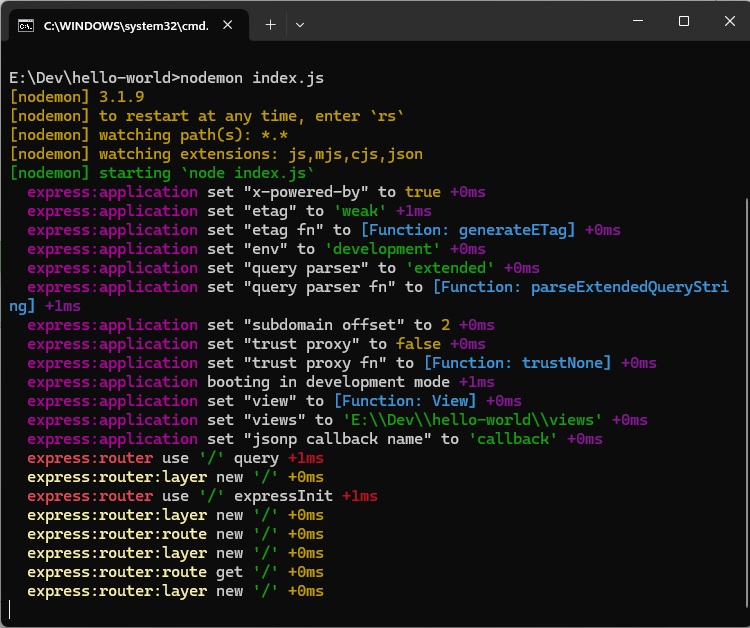
To see all internal logs used in express, set the DEBUG environment variable to express:* when starting the app:
 These logs are very helpful when a component of your app is not
functioning right. This verbose output might be a little overwhelming.
You can also restrict the DEBUG variable to specific area to be logged.
For example, if you wish to restrict the logger to application and
router, you can use:
These logs are very helpful when a component of your app is not
functioning right. This verbose output might be a little overwhelming.
You can also restrict the DEBUG variable to specific area to be logged.
For example, if you wish to restrict the logger to application and
router, you can use:
To see all internal logs used in express, set the DEBUG environment variable to express:* when starting the app:
DEBUG=express:* node index.jsYou'll get a colorized output like:
These logs are very helpful when a component of your app is not
functioning right. This verbose output might be a little overwhelming.
You can also restrict the DEBUG variable to specific area to be logged.
For example, if you wish to restrict the logger to application and
router, you can use: DEBUG=express:application,express:router node index.jsDebug is turned off by default and is automatically turned off in production environment. Debug can also be extended to meet your needs, you can read more about it at its npm page.


No comments:
Post a Comment