Architecture
The below figure show the architecture of an Ember.js which
illustrates an interaction between routes, controllers, views, templates
and models.
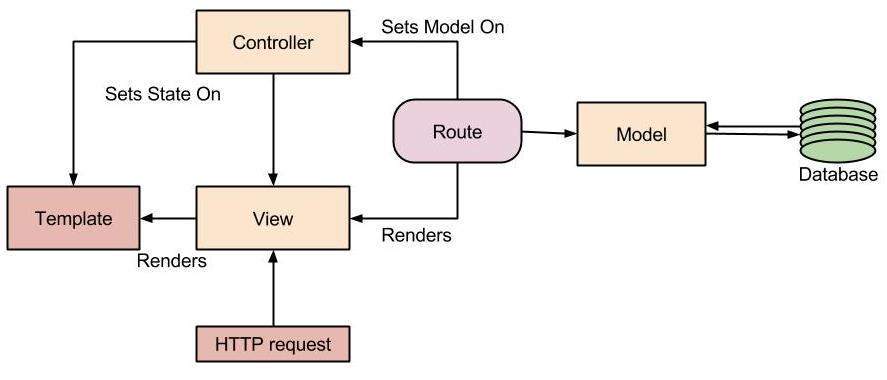
The architecture of an Ember.js has following contents:
- Model
- View
- Template
- Controller
- Route
Model
The model and route are associated because model implements the route
by passing as an argument to a calling route. It manipulates the data
stored in the database. The model is the simple class that extends the
functionality of the
Ember Data. Ember Data is a library that tightly coupled with the Ember.js to manipulate with the data stored in the database.
View
Views are created for two reasons:
- If there is complexity of handling the user events.
- You can create a re-usable component.
Views are responsible for handling the user events and update the DOM (document-object-module). The
Handlebar templates
are evaluated to create the view. During the evaluation of templates,
child view will be added. It helps to keep the application system robust
by providing the rich UI for the end-users
Template
Templates are powerful UI for the end-users. You can directly embed
the templates into the HTML tag. Ember.js provides the Handlebar
template library to build the front-end application, which is like
regular HTML. It also supports for the regular expression and
dynamically updates the expression.
Controller
The controller manages the display logic of the model and also
controls the operation between the route, model, and view. It takes the
model from route and makes the connection between the view, model, and
template. Ember.js creates the controller automatically.
Route
A route is a URL representation of the application object and
translates it into to the nested templates. It queries the model from
their model hook to make available in the controller and in the
template. It is declared in the singleton Router object.


ReplyDeleteYou have a great future as a content writer. Keep writing
android Training in Chennai
Python Training in Chennai
Java Training in Chennai
Angular 2 Training in Chennai
AngularJS Training in Chennai