
The cPanel FTP Session interface shows current users, which are
logged in to website through FTP. This interface is helpful and it helps
you to terminate unwanted connections with one click.
To access this feature, click FTP Sessions link from the Files section of cPanel.
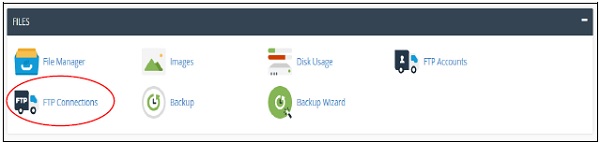 It will open an interface in which it will show the current users who
are logged into your site. If no user has logged in, it will display
the message that no users have logged in.
It will open an interface in which it will show the current users who
are logged into your site. If no user has logged in, it will display
the message that no users have logged in.
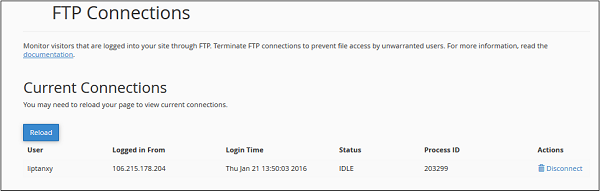 Here it will show the following information −
 Click on Disconnect “User”, and user’s FTP connection will be terminated instantly.
To access this feature, click FTP Sessions link from the Files section of cPanel.
It will open an interface in which it will show the current users who
are logged into your site. If no user has logged in, it will display
the message that no users have logged in.
Here it will show the following information −| Example | ||
| User | Displays username of logged in user | liptanxy |
| Logged in Form | Displays IP address or hostname of user’s system | 106.215.178.204 |
| Login Time | Displays Login Time of User | Thu Jan 21 13:50:03 2016 |
| Status | Displays Sessions status | IDLE |
| Process ID | System’s FTP Session Process ID | 203299 |
| Actions | Terminate the connection | Disconnect |
Terminate a FTP Connection
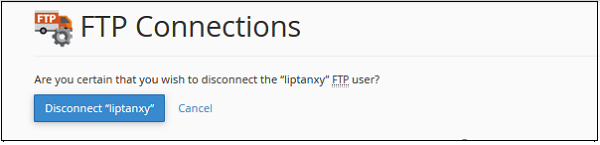
If you think that any user is not doing any activity and is in IDLE mode for a long time, or if you think a user is uploading a very large file, or doing something malicious, you can terminate the connection by clicking the disconnect button from Actions. You will see the following prompt.
Click on Disconnect “User”, and user’s FTP connection will be terminated instantly.

No comments:
Post a Comment