
CloudFlare is a CDN (Content Delivery Network) with both free and paid plans. Most cPanel hosting comes with cPanel CloudFlare plugin, which helps you to quickly signup for CloudFlare and use their CDN. Using CloudFlare has many advantages like it distributes the content over the Internet making our website load faster. It protects the website from SQL injection and DDOS and encrypts the website using SSL.
It protects the website from SQL injection and DDOS and encrypts the website using SSL.
To use CloudFlare CDN, please follow these steps −
Step 1 − Open CloudFlare interface by clicking CloudFlare found in the cPanel Home under CloudFlare – Supercharge your website section.
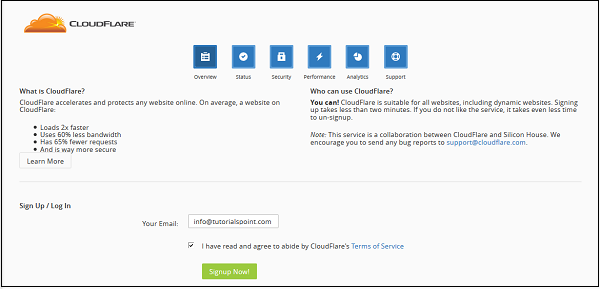
 Step 2 − In CloudFlare Interface under Sign Up / Log In, Enter your email address and click Signup Now. If you have an existing account with CloudFlare, it will ask you to login, otherwise it will sign you up.
 Step 3 − Once you are logged in, you can see the status of your domain in overview section of CloudFlare interface. You will need to change your current Nameservers to those provided by CloudFlare to use it with your website. If you do not like services of CloudFlare, then you can change your domain’s Nameservers back to default.
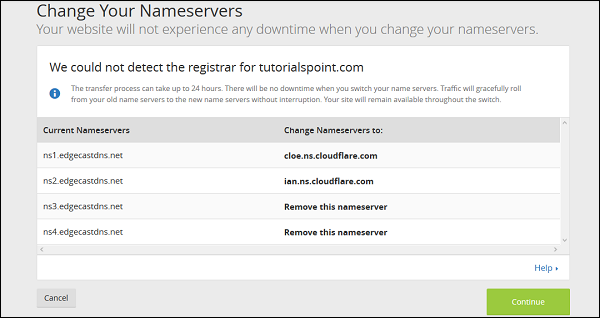 Step 4 − Once you have updated your Nameservers, you can use CloudFlare CDN. You can also view and configure your website for CloudFlare on their website.
It protects the website from SQL injection and DDOS and encrypts the website using SSL.
To use CloudFlare CDN, please follow these steps −
Step 1 − Open CloudFlare interface by clicking CloudFlare found in the cPanel Home under CloudFlare – Supercharge your website section.
Step 2 − In CloudFlare Interface under Sign Up / Log In, Enter your email address and click Signup Now. If you have an existing account with CloudFlare, it will ask you to login, otherwise it will sign you up.
Step 3 − Once you are logged in, you can see the status of your domain in overview section of CloudFlare interface. You will need to change your current Nameservers to those provided by CloudFlare to use it with your website. If you do not like services of CloudFlare, then you can change your domain’s Nameservers back to default.
Step 4 − Once you have updated your Nameservers, you can use CloudFlare CDN. You can also view and configure your website for CloudFlare on their website.

No comments:
Post a Comment