
To update a record in database we first need to get hold of a table using TableRegistry class. We can fetch the instance out of registry using the get() method. The get()
method will take the name of the database table as an argument. Now,
this new instance is used to get particular record that we want to
update.
Call the get() method with this new instance and pass the primary key to find a record which will be saved in another instance. Use this instance to set new values that you want to update and then finally call the save() method with the TableRegistry class’s instance to update record.
config/routes.php
src/controller/UsersController.php
src/Template/Users/index.ctp
src/Template/Users/edit.ctp
http://localhost:85/CakePHP/users
Call the get() method with this new instance and pass the primary key to find a record which will be saved in another instance. Use this instance to set new values that you want to update and then finally call the save() method with the TableRegistry class’s instance to update record.
Example
Make changes in the config/routes.php file as shown in the following code.config/routes.php
<?php
   use Cake\Core\Plugin;
   use Cake\Routing\RouteBuilder;
   use Cake\Routing\Router;

   Router::defaultRouteClass('DashedRoute');
   Router::scope('/', function (RouteBuilder $routes) {
      $routes->connect('/users/edit', ['controller' => 'Users', 'action' => 'edit']);
      $routes->fallbacks('DashedRoute');
   });
   Plugin::routes();
Create a UsersController.php file at src/Controller/UsersController.php. Copy the following code in the controller file.
src/controller/UsersController.php
<?php
   namespace App\Controller;
   use App\Controller\AppController;
   use Cake\ORM\TableRegistry;
   use Cake\Datasource\ConnectionManager;

   class UsersController extends AppController{
      public function index(){
         $users = TableRegistry::get('users');
         $query = $users->find();
         $this->set('results',$query);
      }
      public function edit($id){
         if($this->request->is('post')){
            $username = $this->request->data('username');
            $password = $this->request->data('password');
            $users_table = TableRegistry::get('users');
            $users = $users_table->get($id);
            $users->username = $username;
            $users->password = $password;

            if($users_table->save($users))
            echo "User is udpated";
            $this->setAction('index');
         } else {
            $users_table = TableRegistry::get('users')->find();
            $users = $users_table->where(['id'=>$id])->first();
            $this->set('username',$users->username);
            $this->set('password',$users->password);
            $this->set('id',$id);
         }
      }
   }
?>
Create a directory Users at src/Template, ignore if already created, and under that directory create a view called index.ctp. Copy the following code in that file.
src/Template/Users/index.ctp
<a href = "add">Add User</a>
<table>
   <tr>
      <td>ID</td>
      <td>Username</td>
      <td>Password</td>
      <td>Edit</td>
      <td>Delete</td>
   </tr>

   <?php
      foreach ($results as $row):
         echo "<tr><td>".$row->id."</td>";
         echo "<td>".$row->username."</td>";
         echo "<td>".$row->password."</td>";
         echo "<td><a href = '".$this->Url->build
            (["controller" => "Users","action" => "edit",$row->id]).
            "'>Edit</a></td>";
         echo "<td><a href = '".$this->Url->build
            (["controller" => "Users","action" => "delete",$row->id]).
            "'>Delete</a></td></tr>";
      endforeach;
   ?>
</table>
Create another View file under the Users directory called edit.ctp and copy the following code in it.
src/Template/Users/edit.ctp
<?php
   echo $this->Form->create("Users",array('url'=>'/users/edit/'.$id));
   echo $this->Form->input('username',['value'=>$username]);
   echo $this->Form->input('password',['value'=>$password]);
   echo $this->Form->button('Submit');
   echo $this->Form->end();
?>
Execute the above example by visiting the following URL and click on Edit link to edit record.
http://localhost:85/CakePHP/users
Output
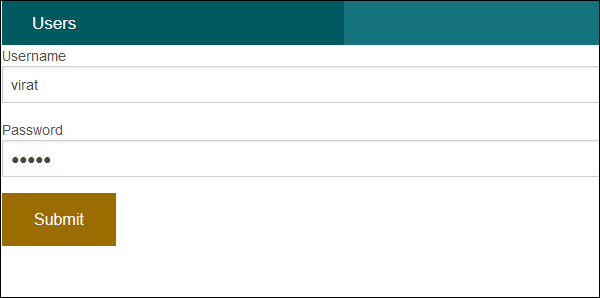
After visiting the above URL and clicking on the Edit link, you will receive the following output where you can edit record.

No comments:
Post a Comment