পৃষ্ঠাসমূহ

Search Your Article

CS


Welcome to GoogleDG – your one-stop destination for free learning resources, guides, and digital tools.

At GoogleDG, we believe that knowledge should be accessible to everyone. Our mission is to provide readers with valuable ebooks, tutorials, and tech-related content that makes learning easier, faster, and more enjoyable.

What We Offer:

  • 📘 Free & Helpful Ebooks – covering education, technology, self-development, and more.

  • 💻 Step-by-Step Tutorials – practical guides on digital tools, apps, and software.

  • 🌐 Tech Updates & Tips – simplified information to keep you informed in the fast-changing digital world.

  • 🎯 Learning Support – resources designed to support students, professionals, and lifelong learners.

    Latest world News 


Our Vision

To create a digital knowledge hub where anyone, from beginners to advanced learners, can find trustworthy resources and grow their skills.

Why Choose Us?

✔ Simple explanations of complex topics
✔ 100% free access to resources
✔ Regularly updated content
✔ A community that values knowledge sharing

We are continuously working to expand our content library and provide readers with the most useful and relevant digital learning materials.

📩 If you’d like to connect, share feedback, or suggest topics, feel free to reach us through the Contact page.

Pageviews

Tuesday, February 14, 2017

CakePHP - Folder Structure

Take a look at the following screenshot. It shows the folder structure of CakePHP.
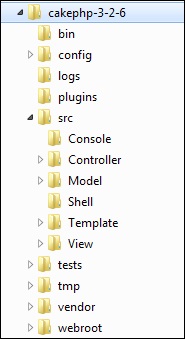
CakePHP Folder Structure The following table describes the role of each folder −

S.No Folder Name & Description
1 bin
The bin folder holds the Cake console executables.
2 config
The config folder holds the (few) configuration files CakePHP uses. Database connection details, bootstrapping, core configuration files and more should be stored here.
3 logs
The logs folder normally contains your log files, depending on your log configuration.
4 plugins
The plugins folder is where the Plugins your application uses are stored.
5 src
The src folder will be where you work your magic: It is where your application’s files will be placed. CakePHP’s src folder is where you will do most of your application development. Let’s look a little closer at the folders inside src.
  • Console Contains the console commands and console tasks for your application.
  • Controller Contains your application’s controllers and their components.
  • Locale Stores string files for internationalization.
  • Model Contains your application’s tables, entities and behaviors.
  • View Presentational classes are placed here: cells, helpers, and template files.
  • Template Presentational files are placed here: elements, error pages, layouts, and view template files.
6 tests
The tests folder will be where you put the test cases for your application.
7 tmp
The tmp folder is where CakePHP stores temporary data. The actual data it stores depends on how you have CakePHP configured, but this folder is usually used to store model descriptions and sometimes session information.
8 vendor
The vendor folder is where CakePHP and other application dependencies will be installed. Make a personal commitment not to edit files in this folder. We can’t help you if you’ve modified the core.
9 webroot
The webroot directory is the public document root of your application. It contains all the files you want to be publically reachable.

No comments:

Post a Comment