
Validator can be created by adding the following two lines in the controller.
After that we have added validation for password field with notEmpty() method which will confirms that password field must not be empty.
config/routes.php
src/Controller/ValidsController.php
src/Template/Valids/index.ctp
use Cake\Validation\Validator;
$validator = new Validator();
Validating Data
Once we have created validator, we can use the validator object to validate data. The following code explains how we can validate data for login webpage.$validator->notEmpty('username', 'We need username.')->add('username',
'validFormat', ['rule' => 'email','message' => 'E-mail must be valid']);
$validator->notEmpty('password', 'We need password.');
$errors = $validator->errors($this->request->data());
Using the $validator object we have first called the notEmpty() method which will ensure that the username must not be empty. After that we have chained the add() method to add one more validation for proper email format.After that we have added validation for password field with notEmpty() method which will confirms that password field must not be empty.
Example
Make Changes in the config/routes.php file as shown in the following program.config/routes.php
<?php
   use Cake\Core\Plugin;
   use Cake\Routing\RouteBuilder;
   use Cake\Routing\Router;

   Router::defaultRouteClass('DashedRoute');
   Router::scope('/', function (RouteBuilder $routes) {
      $routes->connect('validation',['controller'=>'Valids','action'=>'index']);
      $routes->fallbacks('DashedRoute');
   });
   Plugin::routes();
Create a ValidsController.php file at src/Controller/ValidsController.php. Copy the following code in the controller file.
src/Controller/ValidsController.php
<?php
   namespace App\Controller;
   use App\Controller\AppController;
   use Cake\Validation\Validator;

   class ValidsController extends AppController{
      public function index(){
         $validator = new Validator();
         $validator->notEmpty('username', 'We need username.')
            ->add('username', 'validFormat', ['rule' => 'email','message'
            => 'E-mail must be valid']);

         $validator->notEmpty('password', 'We need password.');
         $errors = $validator->errors($this->request->data());
         $this->set('errors',$errors);
      }
   }
?>
Create a directory Valids at src/Template and under that directory create a View file called index.ctp. Copy the following code in that file.src/Template/Valids/index.ctp
<?php
   if($errors){
      foreach($errors as $error)
      foreach($error as $msg)

      echo '<font color = "red">'.$msg.'</font>l';
   } else {
      echo "No errors.";
   }

   echo $this->Form->create("Logins",array('url'=>'/validation'));
   echo $this->Form->input('username');
   echo $this->Form->input('password');
   echo $this->Form->button('Submit');
   echo $this->Form->end();
?>
Execute the above example by visiting the following URL −http://localhost:85/CakePHP/validation
Output
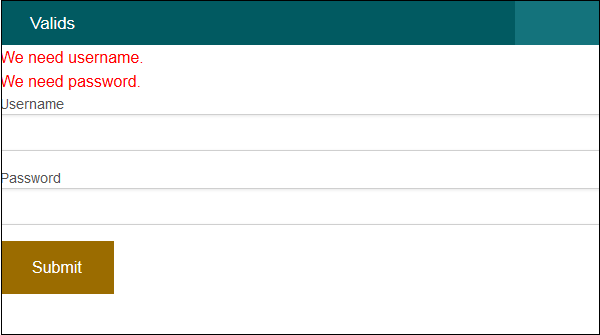
Click on the submit button without entering anything. You will receive the following output.

No comments:
Post a Comment