
So far we studied how to create various types of charts using
JFreeChart APIs using static data. But in production environment, data
is provided in the form of text file with a predefined format, or it
comes directly from the database.
This chapter will explain how we can read a simple data from a given text file from a given location and then use JFreeChart to create a chart of your choice.
This chapter will explain how we can read a simple data from a given text file from a given location and then use JFreeChart to create a chart of your choice.
Business Data
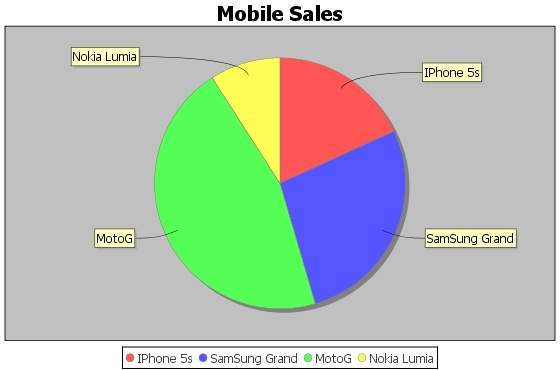
Consider we have a file named mobile.txt, having different mobile brands and their sale (units per day) separated by a simple comma (,):Iphone 5S, 20 Samsung Grand, 20 MOTO G, 40 Nokia Lumia, 10
Chart Generation Based on File
Following is the code to create a Pie Chart based on the information provided in mobile.txt:import java.io.*; import java.util.StringTokenizer; import org.jfree.chart.ChartUtilities; import org.jfree.chart.ChartFactory; import org.jfree.chart.JFreeChart; import org.jfree.data.general.DefaultPieDataset; public class PieChart_File { public static void main( String[ ] args )throws Exception { String mobilebrands[ ] = { "IPhone 5s" , "SamSung Grand" , "MotoG" , "Nokia Lumia" }; InputStream in = new FileInputStream( new File( "C:/temp/test.txt" ) ); BufferedReader reader = new BufferedReader(new InputStreamReader(in ) ); StringBuilder out = new StringBuilder(); String line; DefaultPieDataset dataset = new DefaultPieDataset(); while (( line = reader.readLine() ) != null ) { out.append( line ); } StringTokenizer s = new StringTokenizer( out.toString(), "," ); int i=0; while( s.hasMoreTokens( ) && ( mobilebrands [i] != null ) ) { dataset.setValue(mobilebrands[i], Double.parseDouble( s.nextToken( ) )); i++; } JFreeChart chart = ChartFactory.createPieChart( "Mobile Sales", // chart title dataset, // data true, // include legend true, false); int width = 560; /* Width of the image */ int height = 370; /* Height of the image */ File pieChart = new File( "pie_Chart.jpeg" ); ChartUtilities.saveChartAsJPEG( pieChart, chart, width, height); } }Let us keep the above Java code in PieChart_File.java file, and then compile and run it from command prompt as follows :
$javac PieChart_File.java
$java PieChart_File
If everything is fine , it will compile and run to create JPEG image file named PieChart.jpeg that contains following chart.


No comments:
Post a Comment