
This chapter explains how you can read simple data from a database
table and then use JFreeChart to create a chart of your choice.
Consider this table is having following records :
Business Data
Consider we have following MySQL table mobile_tbl(mobile_brand VARCHAR(100) NOT NULL, unit_sale INT NO NULL);Consider this table is having following records :
| Mobile Brands | Unit Sales |
|---|---|
| IPhone5S | 20 |
| Samsung Grand | 20 |
| MotoG | 40 |
| Nokia Lumia | 10 |
Chart Generation Using Database
Following is the code to create a Pie Chart based on the information provided in mobile_tbl table available in test_db in a MySQL database. Based on your requirements, you can use any other database.import java.io.*; import java.sql.*; import org.jfree.chart.ChartUtilities; import org.jfree.chart.ChartFactory; import org.jfree.chart.JFreeChart; import org.jfree.data.general.DefaultPieDataset; public class PieChart_DB { public static void main( String[ ] args )throws Exception { String mobilebrands[] = { "IPhone 5s", "SamSung Grand", "MotoG", "Nokia Lumia" }; /* Create MySQL Database Connection */ Class.forName( "com.mysql.jdbc.Driver" ); Connection connect = DriverManager.getConnection( "jdbc:mysql://localhost:3306/jf_testdb" , "root", "root123"); Statement statement = connect.createStatement( ); ResultSet resultSet = statement.executeQuery("select * from dataset_tb" ); DefaultPieDataset dataset = new DefaultPieDataset( ); while( resultSet.next( ) ) { dataset.setValue( resultSet.getString( "brandname" ) , Double.parseDouble( resultSet.getString( "datavalue" ))); } JFreeChart chart = ChartFactory.createPieChart( "Mobile Sales", // chart title dataset, // data true, // include legend true, false ); int width = 560; /* Width of the image */ int height = 370; /* Height of the image */ File pieChart = new File( "Pie_Chart.jpeg" ); ChartUtilities.saveChartAsJPEG( pieChart , chart , width , height ); } }Let us keep the above Java code in PieChart_DB.java file, and then compile and run it from command prompt as follows:
$javac PieChart_DB.java
$java PieChart_DB
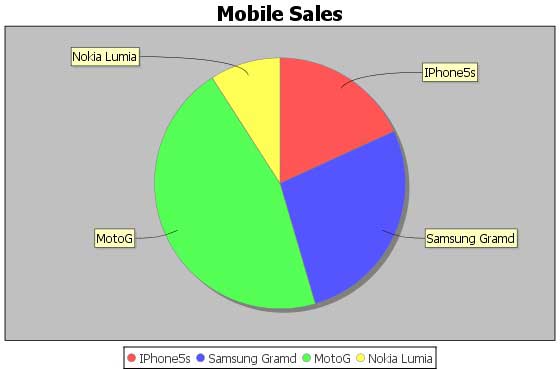
If everything is fine , it will compile and run to create JPEG image file named Pie_Chart.jpeg having the following chart.


No comments:
Post a Comment