পৃষ্ঠাসমূহ

Search Your Article

CS


Welcome to GoogleDG – your one-stop destination for free learning resources, guides, and digital tools.

At GoogleDG, we believe that knowledge should be accessible to everyone. Our mission is to provide readers with valuable ebooks, tutorials, and tech-related content that makes learning easier, faster, and more enjoyable.

What We Offer:

  • 📘 Free & Helpful Ebooks – covering education, technology, self-development, and more.

  • 💻 Step-by-Step Tutorials – practical guides on digital tools, apps, and software.

  • 🌐 Tech Updates & Tips – simplified information to keep you informed in the fast-changing digital world.

  • 🎯 Learning Support – resources designed to support students, professionals, and lifelong learners.

    Latest world News 


Our Vision

To create a digital knowledge hub where anyone, from beginners to advanced learners, can find trustworthy resources and grow their skills.

Why Choose Us?

✔ Simple explanations of complex topics
✔ 100% free access to resources
✔ Regularly updated content
✔ A community that values knowledge sharing

We are continuously working to expand our content library and provide readers with the most useful and relevant digital learning materials.

📩 If you’d like to connect, share feedback, or suggest topics, feel free to reach us through the Contact page.

Pageviews

Monday, January 16, 2017

Eclipse - Java Build Path

Setting the Java Build Path

The Java build path is used while compiling a Java project to discover dependent classes . It is made up of the following items −

  • Code in the source folders.
  • Jars and classes folder associated with the project.
  • Classes and libraries exported by projects referenced by this project.
The java build path can be seen and modified by using the Java Build Path page of the Java Project properties dialog.
To bring up the Java Project properties dialog box, right click on a Java Project in the Package Explorer view and select the Properties menu item. On the left hand side tree select Java Build Path.
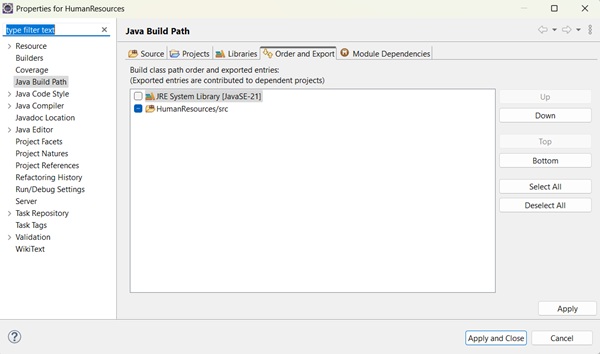
Java Build Path A common requirement seen while developing java applications is to add existing jars to the java build path. This can be accomplished using the Libraries tab. In the Libraries tab, just click on Add JARs if the jar is already in the Eclipse workspace or click on Add External JARs if the jar is elsewhere in the file system.

No comments:

Post a Comment