
Parts of an Eclipse Window
The major visible parts of an eclipse window are −An eclipse perspective is the name given to an initial collection and arrangement of views and an editor area. The default perspective is called java. An eclipse window can have multiple perspectives open in it but only one perspective can be active at any point of time. A user can switch between open perspectives or open a new perspective. A perspective controls what appears in some menus and tool bars.
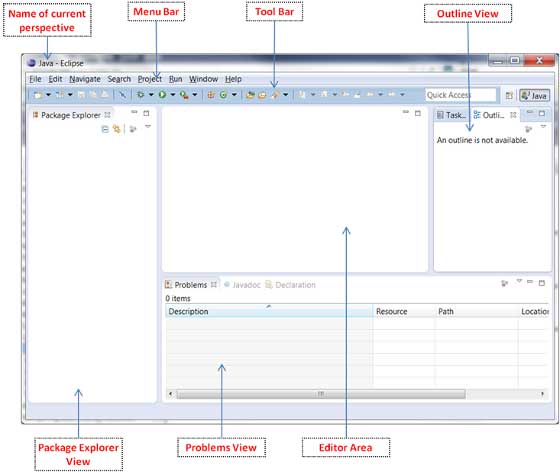 A perspective has only one editor area in which multiple editors can
be open. The editor area is usually surrounded by multiple views. In
general, editors are used to edit the project data and views are used to
view the project metadata. For example the package explorer shows the
java files in the project and the java editor is used to edit a java
file.
A perspective has only one editor area in which multiple editors can
be open. The editor area is usually surrounded by multiple views. In
general, editors are used to edit the project data and views are used to
view the project metadata. For example the package explorer shows the
java files in the project and the java editor is used to edit a java
file.The eclipse window can contain multiple editors and views but only one of them is active at any given point of time. The title bar of the active editor or view looks different from all the others.
The UI elements on the menu bar and tool bar represent commands that can be triggered by an end user.
Using Multiple Windows
Multiple Eclipse Windows can be open at the same time. To open a new window, click on the Windows menu and select the New Window menu item.Each window can have a different perspective open in them. For example you could open two Eclipse windows one in the Java perspective and the other in the Debug perspective. The window showing the Java perspective can be used for editing the java code and the window showing the debug perspective can be used for debugging the application being developed.


No comments:
Post a Comment