
Bridge is used when we need to decouple an abstraction from its
implementation so that the two can vary independently. This type of
design pattern comes under structural pattern as this pattern decouples
implementation class and abstract class by providing a bridge structure
between them.
This pattern involves an interface which acts as a bridge which makes the functionality of concrete classes independent from interface implementer classes. Both types of classes can be altered structurally without affecting each other.
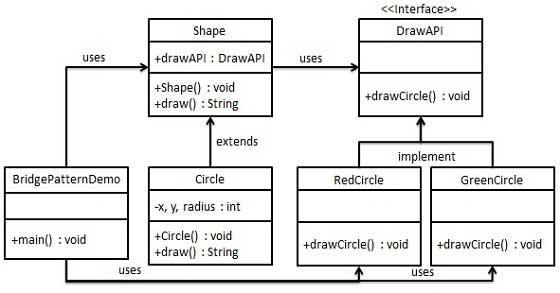
We are demonstrating use of Bridge pattern via following example in which a circle can be drawn in different colors using same abstract class method but different bridge implementer classes.
DrawAPI.java
RedCircle.java
Shape.java
Circle.java
BridgePatternDemo.java
This pattern involves an interface which acts as a bridge which makes the functionality of concrete classes independent from interface implementer classes. Both types of classes can be altered structurally without affecting each other.
We are demonstrating use of Bridge pattern via following example in which a circle can be drawn in different colors using same abstract class method but different bridge implementer classes.
Implementation
We have a DrawAPI interface which is acting as a bridge implementer and concrete classes RedCircle, GreenCircle implementing the DrawAPI interface. Shape is an abstract class and will use object of DrawAPI. BridgePatternDemo, our demo class will use Shape class to draw different colored circle.
Step 1
Create bridge implementer interface.DrawAPI.java
public interface DrawAPI {
   public void drawCircle(int radius, int x, int y);
}
Step 2
Create concrete bridge implementer classes implementing the DrawAPI interface.RedCircle.java
public class RedCircle implements DrawAPI {
   @Override
   public void drawCircle(int radius, int x, int y) {
      System.out.println("Drawing Circle[ color: red, radius: " + radius + ", x: " + x + ", " + y + "]");
   }
}
GreenCircle.java
public class GreenCircle implements DrawAPI {
   @Override
   public void drawCircle(int radius, int x, int y) {
      System.out.println("Drawing Circle[ color: green, radius: " + radius + ", x: " + x + ", " + y + "]");
   }
}
Step 3
Create an abstract class Shape using the DrawAPI interface.Shape.java
public abstract class Shape {
   protected DrawAPI drawAPI;

   protected Shape(DrawAPI drawAPI){
      this.drawAPI = drawAPI;
   }
   public abstract void draw();
}
Step 4
Create concrete class implementing the Shape interface.Circle.java
public class Circle extends Shape {
   private int x, y, radius;

   public Circle(int x, int y, int radius, DrawAPI drawAPI) {
      super(drawAPI);
      this.x = x;
      this.y = y;
      this.radius = radius;
   }

   public void draw() {
      drawAPI.drawCircle(radius,x,y);
   }
}
Step 5
Use the Shape and DrawAPI classes to draw different colored circles.BridgePatternDemo.java
public class BridgePatternDemo {
   public static void main(String[] args) {
      Shape redCircle = new Circle(100,100, 10, new RedCircle());
      Shape greenCircle = new Circle(100,100, 10, new GreenCircle());

      redCircle.draw();
      greenCircle.draw();
   }
}
Step 6
Verify the output.Drawing Circle[ color: red, radius: 10, x: 100, 100] Drawing Circle[ color: green, radius: 10, x: 100, 100]


No comments:
Post a Comment