
Adapter pattern works as a bridge between two incompatible
interfaces. This type of design pattern comes under structural pattern
as this pattern combines the capability of two independent interfaces.
This pattern involves a single class which is responsible to join functionalities of independent or incompatible interfaces. A real life example could be a case of card reader which acts as an adapter between memory card and a laptop. You plugin the memory card into card reader and card reader into the laptop so that memory card can be read via laptop.
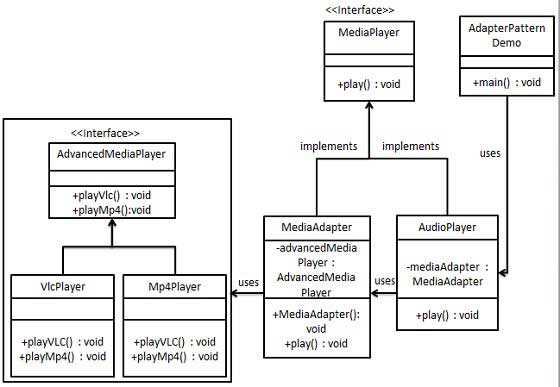
We are demonstrating use of Adapter pattern via following example in which an audio player device can play mp3 files only and wants to use an advanced audio player capable of playing vlc and mp4 files.
We are having another interface AdvancedMediaPlayer and concrete classes implementing the AdvancedMediaPlayer interface. These classes can play vlc and mp4 format files.
We want to make AudioPlayer to play other formats as well. To attain this, we have created an adapter class MediaAdapter which implements the MediaPlayer interface and uses AdvancedMediaPlayer objects to play the required format.
AudioPlayer uses the adapter class MediaAdapter passing it the desired audio type without knowing the actual class which can play the desired format. AdapterPatternDemo, our demo class will use AudioPlayer class to play various formats.
MediaPlayer.java
VlcPlayer.java
MediaAdapter.java
AudioPlayer.java
AdapterPatternDemo.java
This pattern involves a single class which is responsible to join functionalities of independent or incompatible interfaces. A real life example could be a case of card reader which acts as an adapter between memory card and a laptop. You plugin the memory card into card reader and card reader into the laptop so that memory card can be read via laptop.
We are demonstrating use of Adapter pattern via following example in which an audio player device can play mp3 files only and wants to use an advanced audio player capable of playing vlc and mp4 files.
Implementation
We have a MediaPlayer interface and a concrete class AudioPlayer implementing the MediaPlayer interface. AudioPlayer can play mp3 format audio files by default.We are having another interface AdvancedMediaPlayer and concrete classes implementing the AdvancedMediaPlayer interface. These classes can play vlc and mp4 format files.
We want to make AudioPlayer to play other formats as well. To attain this, we have created an adapter class MediaAdapter which implements the MediaPlayer interface and uses AdvancedMediaPlayer objects to play the required format.
AudioPlayer uses the adapter class MediaAdapter passing it the desired audio type without knowing the actual class which can play the desired format. AdapterPatternDemo, our demo class will use AudioPlayer class to play various formats.
Step 1
Create interfaces for Media Player and Advanced Media Player.MediaPlayer.java
public interface MediaPlayer {
   public void play(String audioType, String fileName);
}
AdvancedMediaPlayer.java
public interface AdvancedMediaPlayer {
   public void playVlc(String fileName);
   public void playMp4(String fileName);
}
Step 2
Create concrete classes implementing the AdvancedMediaPlayer interface.VlcPlayer.java
public class VlcPlayer implements AdvancedMediaPlayer{
   @Override
   public void playVlc(String fileName) {
      System.out.println("Playing vlc file. Name: "+ fileName);
   }

   @Override
   public void playMp4(String fileName) {
      //do nothing
   }
}
Mp4Player.java
public class Mp4Player implements AdvancedMediaPlayer{

   @Override
   public void playVlc(String fileName) {
      //do nothing
   }

   @Override
   public void playMp4(String fileName) {
      System.out.println("Playing mp4 file. Name: "+ fileName);
   }
}
Step 3
Create adapter class implementing the MediaPlayer interface.MediaAdapter.java
public class MediaAdapter implements MediaPlayer {

   AdvancedMediaPlayer advancedMusicPlayer;

   public MediaAdapter(String audioType){

      if(audioType.equalsIgnoreCase("vlc") ){
         advancedMusicPlayer = new VlcPlayer();

      }else if (audioType.equalsIgnoreCase("mp4")){
         advancedMusicPlayer = new Mp4Player();
      }
   }

   @Override
   public void play(String audioType, String fileName) {

      if(audioType.equalsIgnoreCase("vlc")){
         advancedMusicPlayer.playVlc(fileName);
      }
      else if(audioType.equalsIgnoreCase("mp4")){
         advancedMusicPlayer.playMp4(fileName);
      }
   }
}
Step 4
Create concrete class implementing the MediaPlayer interface.AudioPlayer.java
public class AudioPlayer implements MediaPlayer {
   MediaAdapter mediaAdapter;

   @Override
   public void play(String audioType, String fileName) {

      //inbuilt support to play mp3 music files
      if(audioType.equalsIgnoreCase("mp3")){
         System.out.println("Playing mp3 file. Name: " + fileName);
      }

      //mediaAdapter is providing support to play other file formats
      else if(audioType.equalsIgnoreCase("vlc") || audioType.equalsIgnoreCase("mp4")){
         mediaAdapter = new MediaAdapter(audioType);
         mediaAdapter.play(audioType, fileName);
      }

      else{
         System.out.println("Invalid media. " + audioType + " format not supported");
      }
   }
}
Step 5
Use the AudioPlayer to play different types of audio formats.AdapterPatternDemo.java
public class AdapterPatternDemo {
   public static void main(String[] args) {
      AudioPlayer audioPlayer = new AudioPlayer();

      audioPlayer.play("mp3", "beyond the horizon.mp3");
      audioPlayer.play("mp4", "alone.mp4");
      audioPlayer.play("vlc", "far far away.vlc");
      audioPlayer.play("avi", "mind me.avi");
   }
}
Step 6
Verify the output.Playing mp3 file. Name: beyond the horizon.mp3 Playing mp4 file. Name: alone.mp4 Playing vlc file. Name: far far away.vlc Invalid media. avi format not supported


No comments:
Post a Comment