
Every user interface considers the following three main aspects:
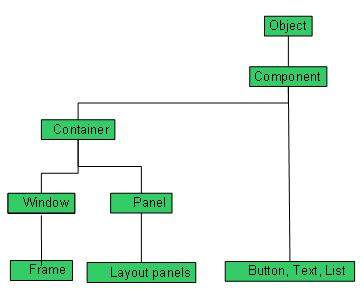 Every AWT controls inherits properties from Component class.
- UI elements : Thes are the core visual elements the user
eventually sees and interacts with. GWT provides a huge list of widely
used and common elements varying from basic to complex which we will
cover in this tutorial.
- Layouts: They define how UI elements should be organized on the screen and provide a final look and feel to the GUI (Graphical User Interface). This part will be covered in Layout chapter.
- Behavior: These are events which occur when the user interacts with UI elements. This part will be covered in Event Handling chapter.
Every AWT controls inherits properties from Component class.| Sr. No. | Control & Description |
|---|---|
| 1 | Component A Component is an abstract super class for GUI controls and it represents an object with graphical representation. |
AWT UI Elements:
Following is the list of commonly used controls while designed GUI using AWT.| Sr. No. | Control & Description |
|---|---|
| 1 | Label A Label object is a component for placing text in a container. |
| 2 | Button This class creates a labeled button. |
| 3 | Check Box A check box is a graphical component that can be in either an on (true) or off (false) state. |
| 4 | Check Box Group The CheckboxGroup class is used to group the set of checkbox. |
| 5 | List The List component presents the user with a scrolling list of text items. |
| 6 | Text Field A TextField object is a text component that allows for the editing of a single line of text. |
| 7 | Text Area A TextArea object is a text component that allows for the editing of a multiple lines of text. |
| 8 | Choice A Choice control is used to show pop up menu of choices. Selected choice is shown on the top of the menu. |
| 9 | Canvas A Canvas control represents a rectangular area where application can draw something or can receive inputs created by user. |
| 10 | Image An Image control is superclass for all image classes representing graphical images. |
| 11 | Scroll Bar A Scrollbar control represents a scroll bar component in order to enable user to select from range of values. |
| 12 | Dialog A Dialog control represents a top-level window with a title and a border used to take some form of input from the user. |
| 13 | File Dialog A FileDialog control represents a dialog window from which the user can select a file. |


No comments:
Post a Comment