পৃষ্ঠাসমূহ

Search Your Article

CS


Welcome to GoogleDG – your one-stop destination for free learning resources, guides, and digital tools.

At GoogleDG, we believe that knowledge should be accessible to everyone. Our mission is to provide readers with valuable ebooks, tutorials, and tech-related content that makes learning easier, faster, and more enjoyable.

What We Offer:

  • 📘 Free & Helpful Ebooks – covering education, technology, self-development, and more.

  • 💻 Step-by-Step Tutorials – practical guides on digital tools, apps, and software.

  • 🌐 Tech Updates & Tips – simplified information to keep you informed in the fast-changing digital world.

  • 🎯 Learning Support – resources designed to support students, professionals, and lifelong learners.

    Latest world News 


Our Vision

To create a digital knowledge hub where anyone, from beginners to advanced learners, can find trustworthy resources and grow their skills.

Why Choose Us?

✔ Simple explanations of complex topics
✔ 100% free access to resources
✔ Regularly updated content
✔ A community that values knowledge sharing

We are continuously working to expand our content library and provide readers with the most useful and relevant digital learning materials.

📩 If you’d like to connect, share feedback, or suggest topics, feel free to reach us through the Contact page.

Pageviews

Monday, January 16, 2017

Hibernate - Environment

This chapter will explain how to install Hibernate and other associated packages to prepare a develop environment for the Hibernate applications. We will work with MySQL database to experiment with Hibernate examples, so make sure you already have setup for MySQL database. For a more detail on MySQL you can check our MySQL Tutorial.

Downloading Hibernate:

It is assumed that you already have latest version of Java is installed on your machine. Following are the simple steps to download and install Hibernate on your machine.
  • Make a choice whether you want to install Hibernate on Windows, or Unix and then proceed to the next step to download .zip file for windows and .tz file for Unix.
  • Download the latest version of Hibernate from http://www.hibernate.org/downloads.
  • At the time of writing this tutorial I downloaded hibernate-distribution-3.6.4.Final and when you unzip the downloaded file it will give you directory structure as follows.
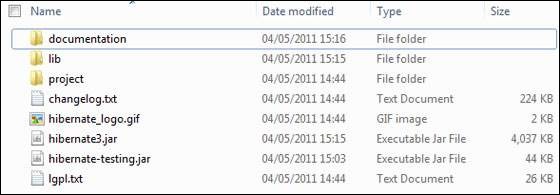
Hibernate Directories

Installing Hibernate:

Once you downloaded and unzipped the latest version of the Hibernate Installation file, you need to perform following two simple steps. Make sure you are setting your CLASSPATH variable properly otherwise you will face problem while compiling your application.
  • Now copy all the library files from /lib into your CLASSPATH, and change your classpath variable to include all the JARs:
  • Finally copy hibernate3.jar file into your CLASSPATH. This file lies in the root directory of the installation and is the primary JAR that Hibernate needs to do its work.

Hibernate Prerequisites:

Following is the list of the packages/libraries required by Hibernate and you should install them before starting with Hibernate. To install these packages you would have to copy library files from /lib into your CLASSPATH, and change your CLASSPATH variable accordingly.
S.N. Packages/Libraries
1 dom4j - XML parsing www.dom4j.org/
2 Xalan - XSLT Processor http://xml.apache.org/xalan-j/
3 Xerces - The Xerces Java Parser http://xml.apache.org/xerces-j/
4 cglib - Appropriate changes to Java classes at runtime http://cglib.sourceforge.net/
5 log4j - Logging Faremwork http://logging.apache.org/log4j
6 Commons - Logging, Email etc. http://jakarta.apache.org/commons
7 SLF4J - Logging Facade for Java http://www.slf4j.org

No comments:

Post a Comment