
To create a simple EJB module, we'll use NetBeans "New project"
wizard. In example below, We'll create a ejb module project named
Component.
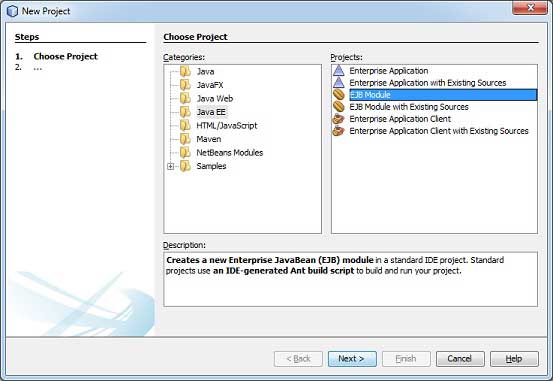 Select project type under category,Java EE, Project type as Ejb Module. Click Next > button. You'll see the following screen.
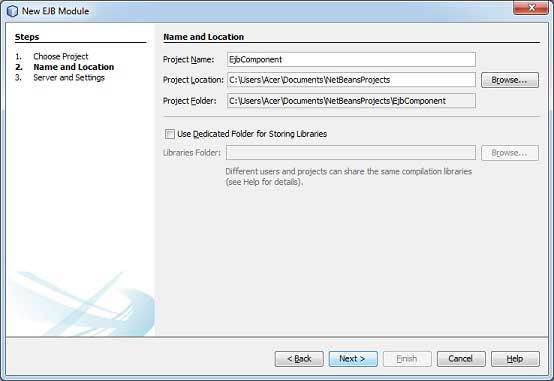 Enter project name and location. Click Next > button. You'll see the following screen.
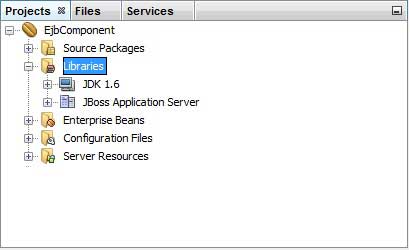
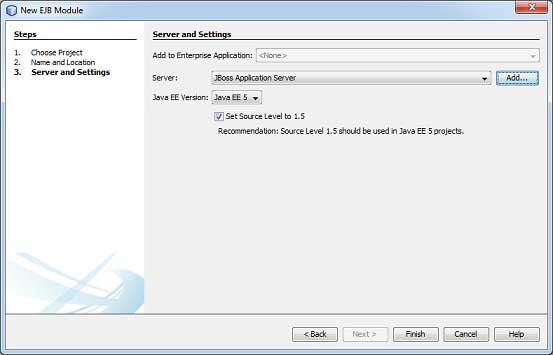 Select Server as JBoss Application Server. Click Finish button. You'll see the following project created by NetBeans.
Select project EjbComponent in project explorer window and right click on it. Select, New > Session Bean.You'll see the New Session Beanwizard.
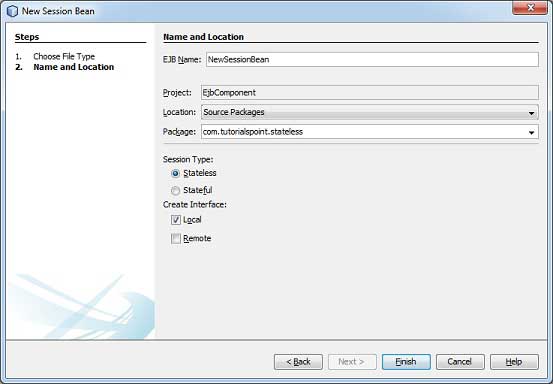 Enter session bean name and package name. Click Finish button. You'll see the following ejb classes created by NetBeans.
LibrarySessionBeanLocal is renamed to LibrarySessionBeanRemote and LibrarySessionBean implements LibrarySessionBeanRemote interface.
LibrarySessionBeanRemote
jndi.properties
EJBTester.java
Verify the following output in Netbeans console.
Create Project
In NetBeans IDE, select ,File > New Project >. You'll see the following screen.
Select project type under category,Java EE, Project type as Ejb Module. Click Next > button. You'll see the following screen.
Enter project name and location. Click Next > button. You'll see the following screen.
Select Server as JBoss Application Server. Click Finish button. You'll see the following project created by NetBeans.
Create a sample EJB
To create a simple EJB, we'll use NetBeans "New" wizard. In example below, We'll create a stateless ejb class named librarySessionBean under EjbComponent project.Select project EjbComponent in project explorer window and right click on it. Select, New > Session Bean.You'll see the New Session Beanwizard.
Enter session bean name and package name. Click Finish button. You'll see the following ejb classes created by NetBeans. - LibrarySessionBean - stateless session bean
- LibrarySessionBeanLocal - local interface for session bean
LibrarySessionBeanLocal is renamed to LibrarySessionBeanRemote and LibrarySessionBean implements LibrarySessionBeanRemote interface.
LibrarySessionBeanRemote
package com.tutorialspoint.stateless;

import java.util.List;
import javax.ejb.Remote;

@Remote
public interface LibrarySessionBeanRemote {

    void addBook(String bookName);

    List getBooks();

}
LibrarySessionBean
package com.tutorialspoint.stateless;

import java.util.ArrayList;
import java.util.List;
import javax.ejb.Stateless;

@Stateless
public class LibrarySessionBean implements LibrarySessionBeanRemote {

    List<String> bookShelf;

    public LibrarySessionBean(){
       bookShelf = new ArrayList<String>();
    }

    public void addBook(String bookName) {
        bookShelf.add(bookName);
    }

    public List<String> getBooks() {
        return bookShelf;
    }
}
Build the Project
- Select EjbComponent project in Project Explorer window
- Right click on it to open context menu.
- Select clean and build.
ant -f C:\\EJB\\EjbComponent clean dist
init:
undeploy-clean:
deps-clean:
Deleting directory C:\EJB\EjbComponent\build
Deleting directory C:\EJB\EjbComponent\dist
clean:
init:
deps-jar:
Created dir: C:\EJB\EjbComponent\build\classes
Copying 3 files to C:\EJB\EjbComponent\build\classes\META-INF
Created dir: C:\EJB\EjbComponent\build\empty
Created dir: C:\EJB\EjbComponent\build\generated-sources\ap-source-output
Compiling 2 source files to C:\EJB\EjbComponent\build\classes
warning: [options] bootstrap class path not set in conjunction with -source 1.6
Note: C:\EJB\EjbComponent\src\java\com\tutorialspoint\stateless
\LibraryPersistentBean.java uses unchecked or unsafe operations.
Note: Recompile with -Xlint:unchecked for details.
1 warning
compile:
library-inclusion-in-archive:
Created dir: C:\EJB\EjbComponent\dist
Building jar: C:\EJB\EjbComponent\dist\EjbComponent.jar
dist:
BUILD SUCCESSFUL (total time: 3 seconds)
Start the Application Server
- Select JBoss application server under Servers in Services window
- Right click on it to open context menu.
- Select start.
Calling C:\jboss-5.1.0.GA\bin\run.conf.bat
=========================================================================

  JBoss Bootstrap Environment

  JBOSS_HOME: C:\jboss-5.1.0.GA

  JAVA: C:\Program Files (x86)\Java\jdk1.6.0_21\bin\java

  JAVA_OPTS: -Dprogram.name=run.bat -Xms128m -Xmx512m -server

  CLASSPATH: C:\jboss-5.1.0.GA\bin\run.jar

=========================================================================

16:25:50,062 INFO  [ServerImpl] Starting JBoss (Microcontainer)...
16:25:50,062 INFO  [ServerImpl] Release ID: JBoss [The Oracle] 5.1.0.GA (build: SVNTag=JBoss_5_1_0_GA date=200905221634)
...

16:26:40,420 INFO  [TomcatDeployment] deploy, ctxPath=/admin-console
16:26:40,485 INFO  [config] Initializing Mojarra (1.2_12-b01-FCS) for context '/admin-console'
16:26:42,362 INFO  [TomcatDeployment] deploy, ctxPath=/
16:26:42,406 INFO  [TomcatDeployment] deploy, ctxPath=/jmx-console
16:26:42,471 INFO  [Http11Protocol] Starting Coyote HTTP/1.1 on http-127.0.0.1-8080
16:26:42,487 INFO  [AjpProtocol] Starting Coyote AJP/1.3 on ajp-127.0.0.1-8009
16:26:42,493 INFO  [ServerImpl] JBoss (Microcontainer) [5.1.0.GA (build: SVNTag=JBoss_5_1_0_GA date=200905221634)] Started in 52s:427ms
Deploy the Project
- Select EjbComponent project in Project Explorer window
- Right click on it to open context menu.
- Select Deploy.
ant -f C:\\EJB\\EjbComponent -DforceRedeploy=true -Ddirectory.deployment.supported=false -Dnb.wait.for.caches=true run
init:
deps-jar:
compile:
library-inclusion-in-archive:
Building jar: C:\EJB\EjbComponent\dist\EjbComponent.jar
dist-directory-deploy:
pre-run-deploy:
Checking data source definitions for missing JDBC drivers...
Distributing C:\EJB\EjbComponent\dist\EjbComponent.jar to [org.jboss.deployment.spi.LocalhostTarget@1e4f84ee]
Deploying C:\EJB\EjbComponent\dist\EjbComponent.jar
Applicaton Deployed
Operation start started
Operation start completed
post-run-deploy:
run-deploy:
run:
BUILD SUCCESSFUL (total time: 2 seconds)
JBoss Application server log output
16:30:00,963 INFO  [DeployHandler] Begin start, [EjbComponent.jar]
...
16:30:01,233 INFO  [Ejb3DependenciesDeployer] Encountered deployment AbstractVFSDeploymentContext@12038795{vfszip:/C:/jboss-5.1.0.GA/server/default/deploy/EjbComponent.jar/}
...
16:30:01,281 INFO  [JBossASKernel]    jndi:LibrarySessionBean/remote-com.tutorialspoint.stateless.LibrarySessionBeanRemote
16:30:01,281 INFO  [JBossASKernel]    Class:com.tutorialspoint.stateless.LibrarySessionBeanRemote
16:30:01,281 INFO  [JBossASKernel]    jndi:LibrarySessionBean/remote
16:30:01,281 INFO  [JBossASKernel]  Added bean(jboss.j2ee:jar=EjbComponent.jar,name=
LibrarySessionBean,service=EJB3) to KernelDeployment of: EjbComponent.jar
16:30:01,282 INFO  [JBossASKernel] installing bean: jboss.j2ee:jar=EjbComponent.jar,name=BookMessageHandler,service=EJB3
16:30:01,282 INFO  [JBossASKernel]   with dependencies:
16:30:01,282 INFO  [JBossASKernel]   and demands:
16:30:01,282 INFO  [JBossASKernel]    jboss.ejb:service=EJBTimerService
...
16:30:01,283 INFO  [EJB3EndpointDeployer] Deploy AbstractBeanMetaData@5497cb{name=jboss.j2ee:jar=EjbComponent.jar, name=LibrarySessionBean, service=EJB3_endpoint bean=org.jboss.ejb3.endpoint.deployers.impl.EndpointImpl properties=[container] constructor=null autowireCandidate=true}
...
16:30:01,394 INFO  [SessionSpecContainer] Starting jboss.j2ee:jar=EjbComponent.jar,name=LibrarySessionBean,service=EJB3
16:30:01,395 INFO  [EJBContainer] STARTED EJB: com.tutorialspoint.stateless.LibrarySessionBean ejbName: LibrarySessionBean
16:30:01,401 INFO  [JndiSessionRegistrarBase] Binding the following Entries in Global JNDI:
   LibrarySessionBean/remote - EJB3.x Default Remote Business Interface
   LibrarySessionBean/remote-com.tutorialspoint.stateless.LibrarySessionBeanRemote - EJB3.x Remote Business Interface
16:30:02,723 INFO  [SessionSpecContainer] Starting jboss.j2ee:jar=EjbComponent.jar,name=LibrarySessionBean,service=EJB3
16:30:02,723 INFO  [EJBContainer] STARTED EJB: com.tutorialspoint.stateless.LibrarySessionBean ejbName: LibrarySessionBean
16:30:02,731 INFO  [JndiSessionRegistrarBase] Binding the following Entries in Global JNDI:

   LibrarySessionBean/remote - EJB3.x Default Remote Business Interface
   LibrarySessionBean/remote-com.tutorialspoint.stateless.LibrarySessionBeanRemote - EJB3.x Remote Business Interface
Create Client to access EJB
- In NetBeans IDE, select ,File > New Project >.
- Select project type under category,Java, Project type as Java Application. Click Next > button.
- Enter project name and location. Click Finish > button. We've chosen name as EjbTester.
- Right click on project name in Project explorer window. Select properties.
- Add ejb component project created earlier under libraries using Add Project button in compile tab.
- Add jboss libraries using Add jar/folder button in compile tab. Jboss libraries can be located at <jboss installation folder>> client folder.
jndi.properties
java.naming.factory.initial=org.jnp.interfaces.NamingContextFactory
java.naming.factory.url.pkgs=org.jboss.naming:org.jnp.interfaces
java.naming.provider.url=localhost
Create package com.tutorialspoint.test and EJBTester.java class under it.
EJBTester.java
package com.tutorialspoint.test;

import com.tutorialspoint.stateless.LibrarySessionBeanRemote;
import java.io.BufferedReader;
import java.io.FileInputStream;
import java.io.IOException;
import java.io.InputStreamReader;
import java.util.List;
import java.util.Properties;
import javax.naming.InitialContext;
import javax.naming.NamingException;


public class EJBTester {

   BufferedReader brConsoleReader = null;
   Properties props;
   InitialContext ctx;
   {
      props = new Properties();
      try {
      props.load(new FileInputStream("jndi.properties"));
      } catch (IOException ex) {
      ex.printStackTrace();
      }
      try {
      ctx = new InitialContext(props);
      } catch (NamingException ex) {
      ex.printStackTrace();
      }
      brConsoleReader =
      new BufferedReader(new InputStreamReader(System.in));
   }
   public static void main(String[] args) {

      EJBTester ejbTester = new EJBTester();

      ejbTester.testStatelessEjb();
   }
   private void showGUI(){
      System.out.println("**********************");
      System.out.println("Welcome to Book Store");
      System.out.println("**********************");
      System.out.print("Options \n1. Add Book\n2. Exit \nEnter Choice: ");
   }
   private void testStatelessEjb(){
      try {
         int choice = 1;
         LibrarySessionBeanRemote libraryBean =
         (LibrarySessionBeanRemote)ctx.lookup("LibrarySessionBean/remote");
         while (choice != 2) {
            String bookName;
            showGUI();
            String strChoice = brConsoleReader.readLine();
            choice = Integer.parseInt(strChoice);
            if (choice == 1) {
               System.out.print("Enter book name: ");
               bookName = brConsoleReader.readLine();
               libraryBean.addBook(bookName);
            }else if (choice == 2) {
               break;
            }
         }
         List<String> booksList = libraryBean.getBooks();
         System.out.println("Book(s) entered so far: " + booksList.size());
         for (int i = 0; i < booksList.size(); ++i) {
         System.out.println((i+1)+". " + booksList.get(i));
         }
         LibrarySessionBeanRemote libraryBean1 =
         (LibrarySessionBeanRemote)ctx.lookup("LibrarySessionBean/remote");
         List<String> booksList1 = libraryBean1.getBooks();
         System.out.println(
         "***Using second lookup to get library stateless object***");
         System.out.println(
         "Book(s) entered so far: " + booksList1.size());
         for (int i = 0; i < booksList1.size(); ++i) {
            System.out.println((i+1)+". " + booksList1.get(i));
         }
      } catch (Exception e) {
         System.out.println(e.getMessage());
         e.printStackTrace();
      }finally {
         try {
            if(brConsoleReader !=null){
               brConsoleReader.close();
            }
         } catch (IOException ex) {
            System.out.println(ex.getMessage());
         }
      }
   }
}
Run Client to access EJB
Locate EJBTester.java in project explorer. Right click on EJBTester class and select run file.Verify the following output in Netbeans console.
run:
**********************
Welcome to Book Store
**********************
Options
1. Add Book
2. Exit
Enter Choice: 1
Enter book name: Learn Java
**********************
Welcome to Book Store
**********************
Options
1. Add Book
2. Exit
Enter Choice: 2
Book(s) entered so far: 1
1. Learn Java
***Using second lookup to get library stateless object***
Book(s) entered so far: 0
BUILD SUCCESSFUL (total time: 13 seconds)
In following chapters, we'll cover multiple aspects of this complete ejb application.


No comments:
Post a Comment