
We normally use triangles to construct meshes. Since WebGL uses GPU
accelerated computing, the information about these triangles should be
transferred from CPU to GPU which takes a lot of communication overhead.
WebGL provides a solution to reduce the communication overhead. Since it uses ES SL (Embedded System Shader Language) that runs on GPU, we write all the required programs to draw graphical elements on the client system using shader programs (the programs which we write using OpenGL ES Shading Language / GLSL).
These shaders are the programs for GPU and the language used to write shader programs is GLSL. In these shaders, we define exactly how vertices, transformations, materials, lights, and camera interact with one another to create a particular image.
In short, it is a snippet that implements algorithms to get pixels for a mesh. We will discuss more about shaders in later chapters. There are two types of shaders − Vertex Shader and Fragment Shader.
In the ES GL code of vertex shader, programmers have to define attributes to handle the data. These attributes point to a Vertex Buffer Object written in JavaScript.
The following tasks can be performed using vertex shaders −
The following tasks can be performed using Fragment shaders −
WebGL provides a solution to reduce the communication overhead. Since it uses ES SL (Embedded System Shader Language) that runs on GPU, we write all the required programs to draw graphical elements on the client system using shader programs (the programs which we write using OpenGL ES Shading Language / GLSL).
These shaders are the programs for GPU and the language used to write shader programs is GLSL. In these shaders, we define exactly how vertices, transformations, materials, lights, and camera interact with one another to create a particular image.
In short, it is a snippet that implements algorithms to get pixels for a mesh. We will discuss more about shaders in later chapters. There are two types of shaders − Vertex Shader and Fragment Shader.
Vertex Shader
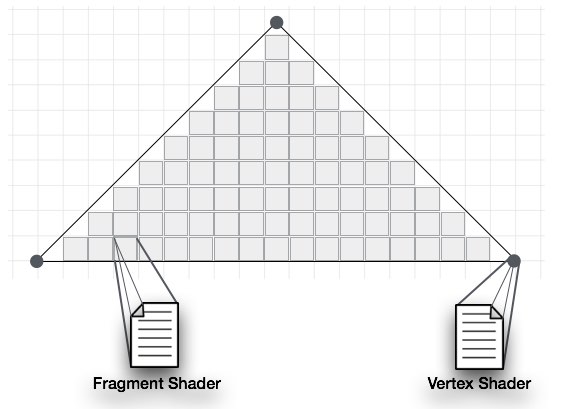
Vertext shader is the program code called on every vertex. It is used to transform (move) the geometry (ex: triangle) from one place to another. It handles the data of each vertex (per-vertex data) such as vertex coordinates, normals, colors, and texture coordinates.In the ES GL code of vertex shader, programmers have to define attributes to handle the data. These attributes point to a Vertex Buffer Object written in JavaScript.
The following tasks can be performed using vertex shaders −
- Vertex transformation
- Normal transformation and normalization
- Texture coordinate generation
- Texture coordinate transformation
- Lighting
- Color material application
Fragment Shader(Pixel Shader)
A mesh is formed by multiple triangles, and the surface of each of the triangles is known as a fragment. Fragment shader is the code that runs on all pixels of every fragment. It is written to calculate and fill the color on individual pixels.The following tasks can be performed using Fragment shaders −
- Operations on interpolated values
- Texture access
- Texture application
- Fog
- Color sum
OpenGL ES SL Variables
The full form of OpenGL ES SL is OpenGL Embedded System Shading Language. To handle the data in the shader programs, ES SL provides three types of variables. They are as follows −- Attributes − These variables hold the input values of the vertex shader program. Attributes point to the vertex buffer objects that contains per-vertex data. Each time the vertex shader is invoked, the attributes point to VBO of different vertices.
- Uniforms − These variables hold the input data that is common for both vertex and fragment shaders, such as light position, texture coordinates, and color.
- Varyings − These variables are used to pass the data from the vertex shader to the fragment shader.


No comments:
Post a Comment