
TurboGears provides a convenient decorator called paginate() to
divide output in the pages. This decorator is combined with the expose()
decorator. The @Paginate() decorator takes the dictionary object of
query result as argument. In addition, the number of records per page
are decided by value of items_per_page attribute. Ensure that you import
paginate function from tg.decorators into your code.
Rewrite listrec() function in root.py as follows −
In the studentlist.html template, page navigation is enabled by adding tmpl_context.paginators.entries.pager() below the py:for directive. The code for this template should be as below −
Rewrite the showgrid() function as follows −
 By clicking the Edit button in the third row, it will redirect to the following URL http://localhost:8080/edit?name=Rajesh+Patil
Rewrite listrec() function in root.py as follows −
from tg.decorators import paginate
class RootController(BaseController):
   @expose ("hello.templates.studentlist")
   @paginate("entries", items_per_page = 3)

   def listrec(self):
      entries = DBSession.query(student).all()
      return dict(entries = entries)
The items per page are set to be three.
In the studentlist.html template, page navigation is enabled by adding tmpl_context.paginators.entries.pager() below the py:for directive. The code for this template should be as below −
<html xmlns = "http://www.w3.org/1999/xhtml"
   xmlns:py = "http://genshi.edgewall.org/">

   <head>
      <link rel = "stylesheet" type = "text/css" media = "screen"
         href = "${tg.url('/css/style.css')}" />
      <title>Welcome to TurboGears</title>
   </head>

   <body>

      <h1>Welcome to TurboGears</h1>

      <py:with vars = "flash = tg.flash_obj.render('flash', use_js = False)">
         <div py:if = "flash" py:replace = "Markup(flash)" />
      </py:with>

      <h2>Current Entries</h2>

      <table border = '1'>
         <thead>
            <tr>
               <th>Name</th>
               <th>City</th>
               <th>Address</th>
               <th>Pincode</th>
            </tr>
         </thead>

         <tbody>
            <py:for each = "entry in entries">
               <tr>
                  <td>${entry.name}</td>
                  <td>${entry.city}</td>
                  <td>${entry.address}</td>
                  <td>${entry.pincode}</td>
               </tr>
            </py:for>

            <div>${tmpl_context.paginators.entries.pager()}</div>
         </tbody>

      </table>

   </body>

</html>
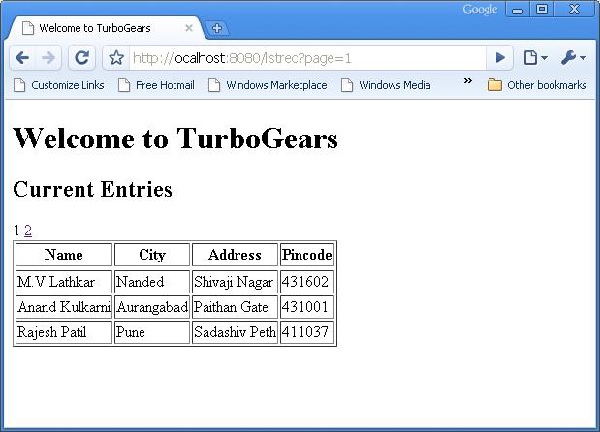
Enter http://localhost:8080/listrec in the browser. The first page of records in the table are displayed. On top of this table, links to page numbers are also seen.
How to Add Pagination Support to Datagrid
It is also possible to add pagination support to datagrid. In the following example, paginated datagrid is designed to display action button. In order to activate action button datagrid object is constructed with following code −student_grid = DataGrid(fields = [('Name', 'name'),('City', 'city'), ('Address','address'), ('PINCODE', 'pincode'), ('Action', lambda obj:genshi.Markup('<a href = "%s">Edit</a>' % url('/edit', params = dict(name = obj.name)))) ])Here the action button is linked to the name parameter of each row in the data grid.
Rewrite the showgrid() function as follows −
@expose('hello.templates.grid')
@paginate("data", items_per_page = 3)

def showgrid(self):
   data = DBSession.query(student).all()
   return dict(page = 'grid', grid = student_grid, data = data)
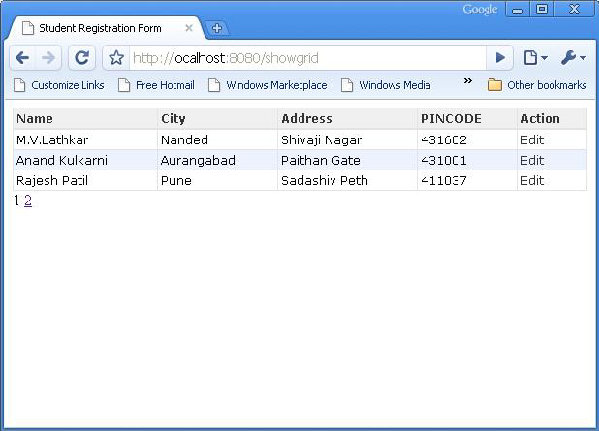
The browser shows paginated datagrid as follows −
By clicking the Edit button in the third row, it will redirect to the following URL http://localhost:8080/edit?name=Rajesh+Patil

No comments:
Post a Comment